AD course for North German Land 4x v2.0
AD course for North German Land 4x v2.0
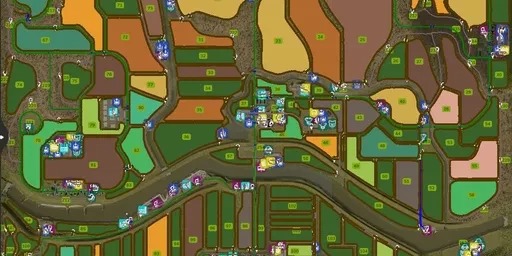
AutoDrive route network for the map “North German Countryside 4x”
Changelog V2.0:
– All field edge routes renewed, and entrances and exits added.
– All farms/outlying farms re-entered
– New routes added, existing routes adjusted
– Building plots connected
– Productions revised
– The one-way street system largely retained
Note: Not all objects/triggers are intentionally connected, as I believe users should also be able to manually configure them.
If you prefer not to do this, alternative AutoDrive routes are available.
Uploading to external websites without my permission is prohibited!
Original download only available here at Forbidden-Mods.de – anything else is pirated…
Download the map: North German Countryside
This is my third route that I have completely driven and published myself.
A Fendt 1050 with a wide tire configuration was used for the main roads, field paths, and field edge routes.
A Deutz 8280 with wide tires and a Krampe Big Body 750 S trailer was used to access the production facilities and sales outlets.
For testing purposes, all routes were again driven with a Fendt 1050 with wide tires and a Brantner TR 3400/2 PT+.
The map is suitable for medium to large vehicles, however, dual rear wheels should be avoided.
– Main roads, side roads
– Field edge courses (capture courses) for ALL fields
– All production facilities and sales outlets are connected; some may require manual operation (due to space constraints)
– Dealers have a “pick-up point” and a “workshop”
– Farms have a “central” access point and, where available, a connection for the multi-silo
– The routes are designed as one-way streets, but where practical, they are also two-way.
Despite all the testing, it’s still possible that some sections might not be 100% perfect.
Please report any issues I encounter so I can correct them, or correct them yourselves.
Duration:
– Approx. 70 hours for initial setup
– Approx. 15 hours for testing all approach points
Note:
– I recommend setting the cornering speed to 60%, otherwise your vehicle may not be able to navigate the curves.
– Simply copy the “AutoDrive_config.xml” file into the appropriate savegame folder located in “Documents\My Games\FarmingSimulator2025”.
An update will be provided as soon as I have a suitable setup for the farms. Suggestions are welcome (please credit the author).
Language translations are also welcome (please credit the author).
I hope you enjoy this course!
Author: Austriafarmer