Factory Week Schedule v1.1
Factory Week Schedule v1.1
Feature Description
Real-time mode: Factories can operate entirely according to real-world time (day, date, month, time).
Game mode: Factories operate according to in-game time but use the real-world day of the week.
Factory logic: Real-time: Day, date, month, and time are completely real.
Factory logic: Game: Real-world day + in-game time determine the factory status.
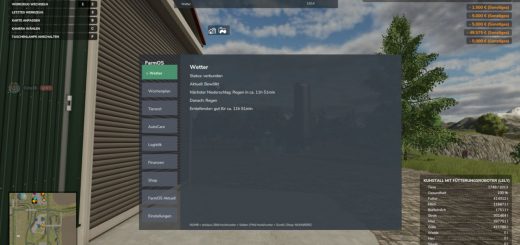
HUD: Factory overview: Displays shift, status, and factory actions.
HUD: Real-time display: Displays real-world day, date, month, and time.
HUD: Game: Displays real-world day of the week, real-world date, and in-game time.
Movable HUD: HUD can be moved with the mouse.
Scalable HUD: HUD size can be adjusted.
HUD status colors: Operating = green, Closing soon = orange, Closed = red.
Event colors: Maintenance = yellow, Downtime = red.
HUD Layout Fix: The HUD no longer overlaps.
Factories Automatic Detection: The mod automatically detects all productions on the map.
Map Factories: Even purchasable map factories are detected.
Multiple Scans: Factories are scanned multiple times at startup to ensure none are missed.
Dedicated Server Compatibility: The mod now runs stably on dedicated servers.
Dedicated Server Dedi-Fix: Production scanning now works correctly on dedicated servers.
Map-Specific XML: Each map gets its own configuration file.
Time Mode: Mode=”realtime” or mode=”game” can be set.
Event System: Events can be enabled or disabled.
Factory Events: Factories can undergo maintenance or outages.
Maintenance Events: Factory closes earlier than planned.
Outage Events: Factory remains closed for 1-2 days.
Event Cycle: Events can occur every 3 months.
Event Display HUD: Maintenance and outages are displayed in the HUD.
Stability Script Fixes: Several Lua bugs have been fixed.
Stability HUD fixes: Errors in display and overlap corrected.
Author: Akita83