Moisture System v1.0

Moisture System v1.0
A comprehensive moisture simulation mod for Farming Simulator 25 that adds realistic moisture tracking to your farming operations.
Overview
The Moisture System mod introduces dynamic moisture levels that affect crops, grass, and bales throughout your farm. Moisture varies based on terrain elevation, weather conditions, and time of day, creating a more realistic farming experience where harvest timing and storage management matter.
Key Features
Dynamic Field Moisture
Field moisture varies across your farm based on several factors:
– Terrain Elevation: Lower areas retain more moisture, while higher elevations are drier
– Weather Conditions: Rain and snow increase moisture, while dry periods reduce it
– Temperature: Warmer temperatures accelerate moisture loss
– Time of Day: Moisture decreases more during daytime than at night
– Monthly Variation: Moisture ranges change throughout the year based on your chosen environment type (Dry/Normal/Wet)
Crop Quality Grading System
Harvested crops are graded from A to D based on their moisture content:
– Grade A: Optimal moisture range – full price
– Grade B: Good moisture – slightly reduced price
– Grade C: Fair moisture – moderately reduced price
– Grade D: Poor moisture – significantly reduced price
Each crop type has its own ideal moisture range. Harvest at the right time to maximize your profits! You can view the detailed grade ranges for all supported crops in the in-game menu. Crops like root crops don’t currently have moisture tracking as it’s less relevant. If you think a crop should be included, please reach out.
Moisture Tracking Throughout Your Operation
The mod tracks moisture on:
– Standing Crops: Fields retain moisture based on weather and terrain
– Harvested Crops: Combines and harvesters transfer field moisture to harvested material
– Vehicles and Equipment: Moisture values are maintained as you move crops between vehicles
– Ground Piles: Dropped piles of crops retain their moisture properties
– Silos and Storage: Sold crops are priced according to their moisture grade
Grass Tedding and Drying
Manage your hay production with realistic grass drying mechanics:
– Tedding: Use a tedder to spread and aerate grass, reducing its moisture content. You can ted multiple times!
– Weather Affects Drying: Sunshine accelerates drying, while rain increases moisture
– Automatic Hay Conversion: When grass dries sufficiently, it automatically converts to hay
– Rain Exposure: Grass piles accumulate rain exposure time when wet
– Progressive Rotting: After enough rain exposure, grass begins to rot and lose volume
Ground Material Rotting
Crop residue and forage left on the ground requires timely collection:
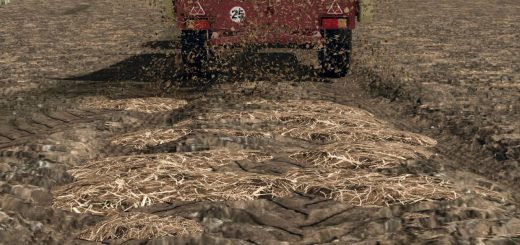
– Straw and Grass Piles: Both grass and straw piles left on the ground track rain exposure
– Grace Period: Piles can tolerate some rain before degradation begins
– Progressive Decay: The longer material has been exposed to rain, the faster it rots
– Drying Out: Piles slowly dry when rain stops, but once rotting starts, it will not stop
– Volume Loss: Rotting material gradually disappears, so collect or bale promptly
Bale Rotting System
Bales left exposed to the elements require proper management:
– Rain Exposure: Bales gradually accumulate rain exposure time when left uncovered during wet weather
– Grace Period: Bales can tolerate some exposure before rotting begins. This is the state ‘Getting Wet’
– Progressive Rotting: The longer bales have been exposed in the past, the faster they rot
– Drying: Bales slowly dry out when rain stops, but once rotting begins, they cannot recover
– Protection: Wrapped bales and bales stored under shelter are protected from weather
– Volume Loss: Rotting bales gradually lose volume
Visual Indicators
Track moisture levels easily with built-in tools:
– Moisture Meter Hand Tool: Equip the moisture meter to read exact field/ground moisture at your location
– HUD Display: Optional field moisture display in the game HUD
– Crop Grade Menu: Access detailed moisture range tables for all crops via the in-game menu (Shift+M)
– Moisture Calendar: View monthly moisture ranges for your chosen environment type
How to Use
Getting Started
– Install the Mod: Place the mod in your Farming Simulator 25 mods folder
– Start Your Farm: The moisture system runs automatically on all savegames
– Access Settings: Open the game settings menu to configure moisture parameters (default settings work well for most players)
Using the Moisture Meter
The moisture meter is a hand tool that lets you check ground/field moisture levels:
– Buy a moisture meter in the Handtools section of the shop
– Select the Moisture Meter
– Press and hold the action button for 4 seconds to get a moisture reading
Alternatively, enable “Show Field Moisture” in settings to see moisture in the field info HUD without using the hand tool.
Managing Crop Quality
– Monitor Field Moisture: Use the moisture meter or HUD to check moisture levels
– Time Your Harvest: Harvest when moisture is in the optimal range for your crop
– Check Grades: View the crop grade menu (Shift+M) to see ideal moisture ranges
– Store Properly: Moisture affects selling price, so plan your sales accordingly
Drying Grass for Hay
– Mow Grass: Cut grass as normal with a mower
– Ted the Windrows: Use a tedder to spread and aerate the grass
– Wait for Drying: Grass will dry over time, especially in sunny weather
– Multiple Passes: Ted multiple times for faster drying
– Bale or Collect: Once dry enough, collect as hay for better storage
Protecting Bales
To prevent bale rot:
– Store Under Roof: Place bales in sheds or under cover
– Wrap Bales: Use a bale wrapper to seal bales from weather
– Monitor Exposure: Check bales regularly if left outside
– Timely Removal: Collect or sell bales before they rot significantly
Configuration
Environment Types
Choose from three climate presets that affect moisture ranges throughout the year:
– Dry: Lower overall moisture levels, drier growing conditions
– Normal: Balanced moisture levels (default)
– Wet: Higher moisture levels, wetter growing conditions
Adjustable Settings
Fine-tune the mod behavior to your preference:
– Moisture Loss Multiplier: Control how fast fields dry out
– Moisture Gain Multiplier: Control how fast moisture increases during rain
– Tedding Moisture Reduction: Adjust how much moisture is removed per tedding pass
– Bale Rotting: Enable or disable bale rot entirely
– Bale Rot Rate: Adjust how fast bales deteriorate
– Bale Grace Period: Change how much rain exposure bales can tolerate
– Bale Drying Rate: Adjust how fast bales dry after rain stops
– Field Moisture Display: Toggle field moisture in the HUD
– Moisture Meter Reporting: Choose between blinking alerts or notifications
Multiplayer
The mod is fully multiplayer compatible:
– Server Settings: The host/admin controls moisture settings
– Synchronized: All players see the same moisture values and grades
– Permissions: Set in the server admin menu
In-Game Menus
Access moisture information through the in-game menu system:
– Crop Grade Values: View moisture ranges and price multipliers for all crops
– Moisture Calendar: See monthly moisture ranges for your environment type
– Game Settings: Configure all mod settings
Tips for Success
– Learn Your Crops: Each crop has different optimal moisture ranges – check the grade menu
– Watch the Weather: Plan harvests around weather patterns for best results
– Use Terrain: Remember that low areas are wetter – use this to guide decisions on harvesting and crop choice
– Collect Promptly: Don’t leave grass or straw piles exposed to rain – they will rot
– Protect or Process: Bale and wrap materials, or store them before weather turns bad
– Multiple Tedding: Ted grass several times in good weather for fastest drying
– Monitor Moisture: Check field moisture before starting harvest
Author: sprkem