Grimme Receiving Hopper With Automatic Pallet Stacking V1.0


Grimme Receiving Hopper With Automatic Pallet Stacking V1.0
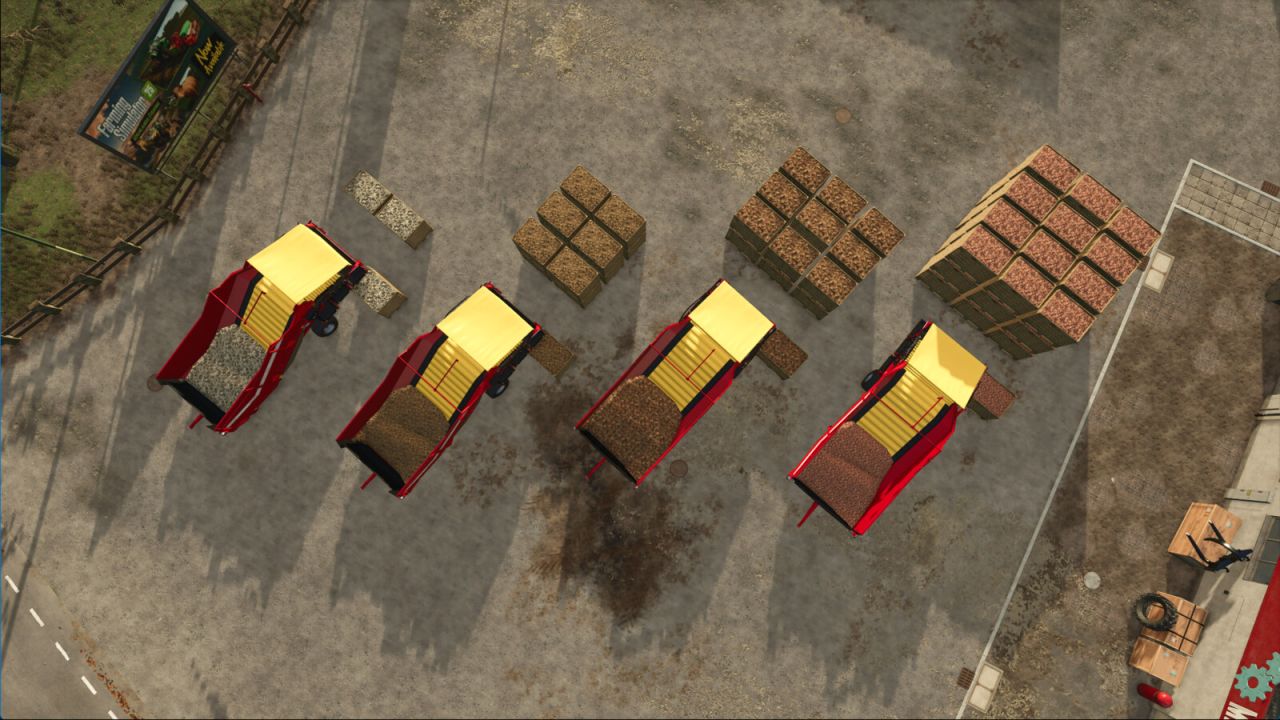
A configurable receiving hopper equipped with a fully automatic palletizing stacker. Bulk root crops are processed into neatly packed boxes and placed directly onto pallets in a selectable stacking pattern.
Each box is based on the base-game Dewulf vegetable pallet and holds up to 2,000 liters. The box also has a fillTrigger so can be used to fill implements. The palletizer is fully compatible with shed storage triggers and checks per-slot occupancy before placing a new box. This allows continuous operation together with mods such as Universal Autoload, which can empty the pallet grid dynamically.
Important notes:
When loading a savegame, the very first pallet from the previous session must be removed manually, as it is not tracked internally.
It is recommended to clear the pallet grid from a previous session, as these are not always tracked. Keep the unloading grid clear from objects. Onion support (Highlands Fishing Expansion) not fully tested, but should be working.
Supported features include multiple unloading speeds (175 / 330 / 1250 l/s), hopper capacity upgrades up to 200,000 liters, and four pallet stacking layouts (2×1×1, 2×3×2, 3×3×2, 3×4×3).
Category: Belts
Price: 65,000 $
Capacity: 13,000 – 18,000 – 35,000 – 200,000 L
Box capacity: 2,000 L
Features: Automatic palletizer, multi-pattern stacking, shed-trigger support, UAL-compatible
Author: Kuubs Machinery