Road Painter V1.0


Road Painter V1.0


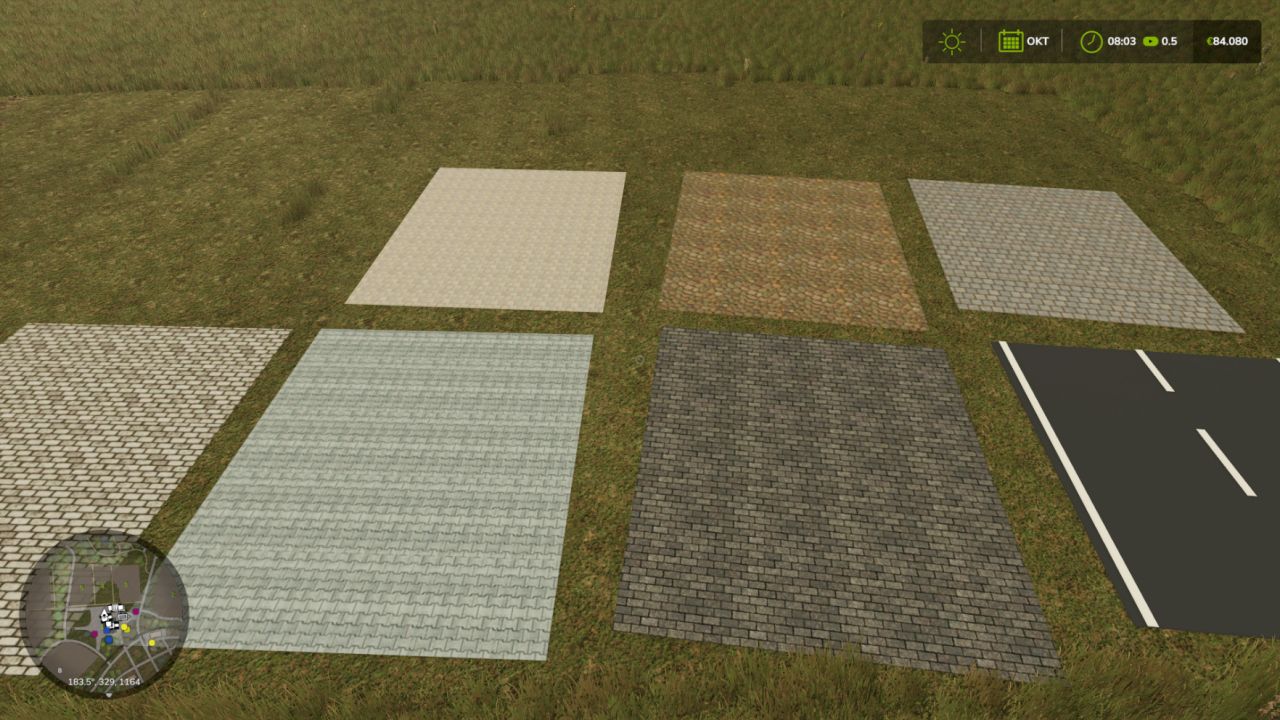
With Road Painter for LS25, you can create your own roads directly in the game. Different surfaces, freely drawn routes and ready-made intersection templates allow you to customize your farm roads and connecting routes.

Features and keyboard shortcuts
Alt + Insert – Open or close the drawing view.
F2 – Change surface: asphalt, French cobblestone, bone paving, three cobblestone variants and paving stones.
F3 – Choose road width: 3, 4, 5, 6, 7 or 8 metres.
F4 – Adjust orientation: Rotate intersections in 15° steps or, in curve mode, change the bend and curve side.
F5 – Change construction template: road, T-junction or X-junction.
F6 – Turn placement aid on or off: preview with guide lines and crosshair.
F7 – Choose straight or freehand: also ends curve mode.
F8 – Turn two-point curve mode on or off: click the starting point, choose the bend with F4 and click the end point.
F9 – Turn the road tool on or off.
F10 – Undo: Remove the last road from your own farm or discard a saved curve start.

Left mouse button – Build: Hold, drag and release for freehand routes and straight roads. Place intersections with a click.
Arrow keys – Move the camera: Hold Shift to move faster. Alternatively, move the mouse to the edge of the drawing area.
Esc – Leave the drawing view.
Notes: For LS25 on PC. Multiplayer is currently a test version. No automatic terrain leveling.


Author: Shippou

Report bugs in the comments and help modders improve this mod. Always check the comments, you can find a solution.


Helpful Information: How to install FS25 mods | FS25 System Requiremnts | FS25 Modding Tutorial | Giants Editor for FS25 | How to Convert mods | FS25 Cheats

More Misc mods


About Farming Simulator 25 mods
Farming Simulator 25 supports game modding for PC, Xbox, or PS5. FS25 Mod may change your game from small to complete changes. You can create a Farming Simulator 25 mod file and share it with our community. When is a good time to try Farming Simulator 25 mods? We recommend playing a game with these FS25 mods after you finish the Farming Simulator 25 starting pack and are bored with the game basics. So it's time to try new machines, such as harvesters or tractors, which are not included in the basic game version.
As you already know, Farming Simulator 25 developers support mods installation, which will add more vehicles or lands to your game. Check our Best FS25 mods lists for PC, Mac, PS5 or Xbox Series. Just follow these simple steps: choose the LS25 mods category, download the mod for the Farming Simulator 2025 version, and install it into the mod folder. Remember, all Farming Simulator 25 Mods are free, and download as many as you want with no limits. We want to create one of the biggest Farming Simulator 25 Community and invite you to share FS25 mods with everyone.

Leave a Reply

Do you need help or to say thanks to the mod author? Just leave a comment below!