Animal Food Calculator V1.2
Animal Food Calculator V1.2
Animal Food Calculator – understand, plan and stop feeding in the dark
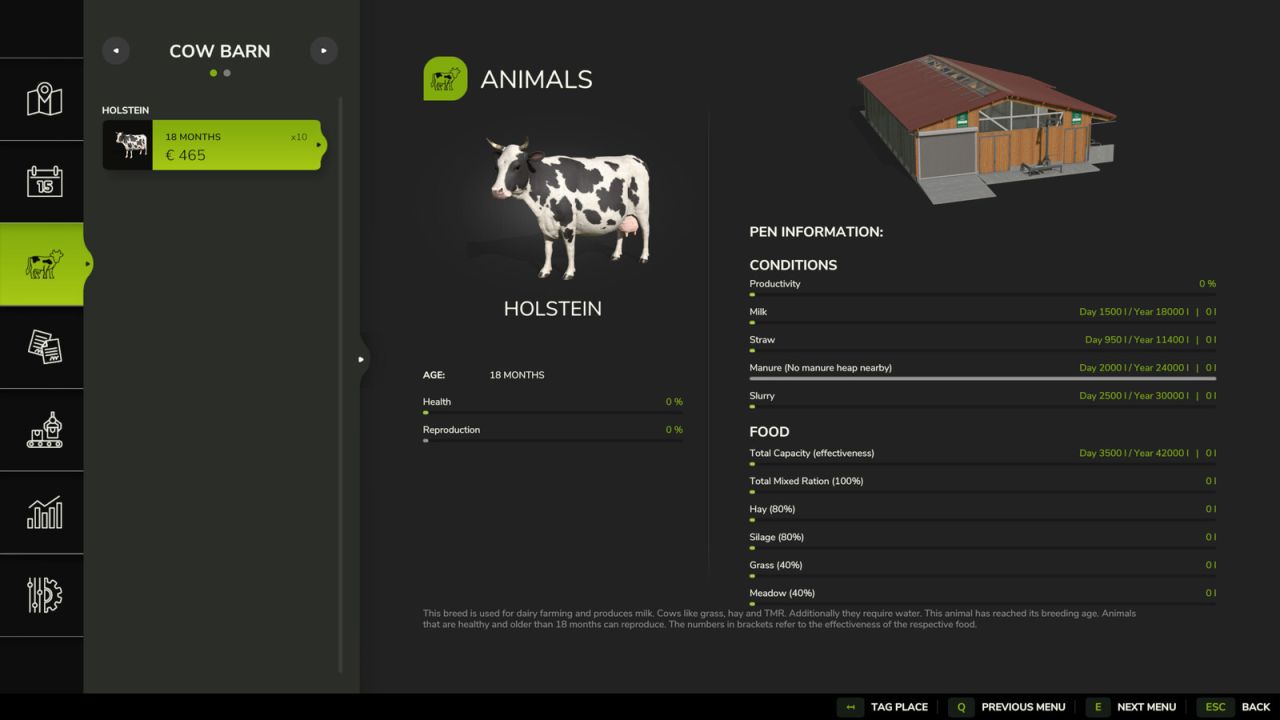
The Animal Food Calculator, or AFC for short, is your tool for getting a clearer overview of animal husbandry in FS25.
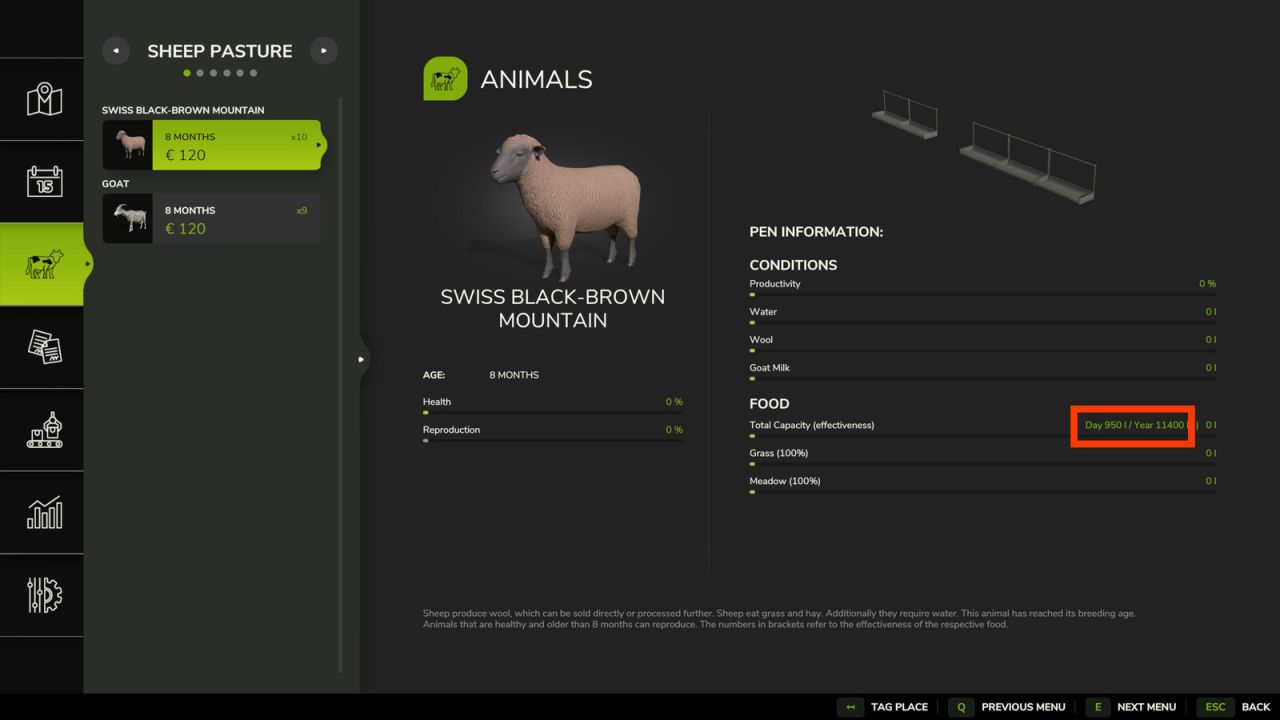
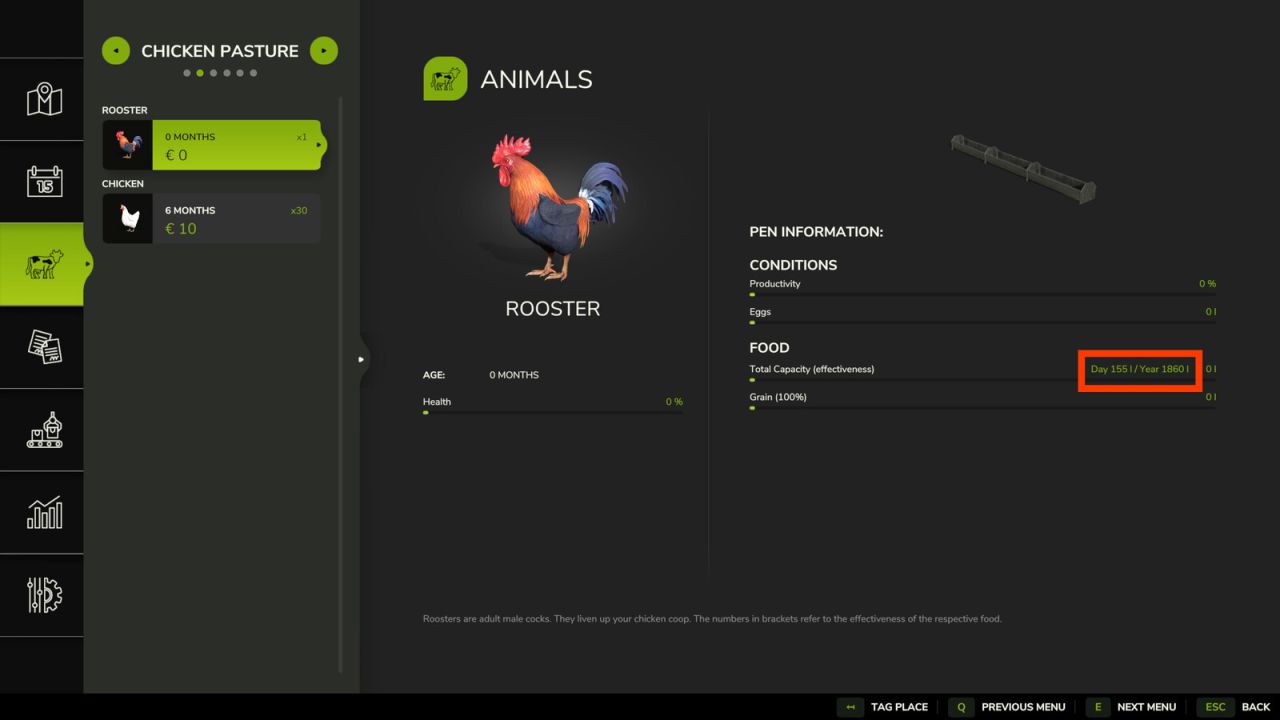
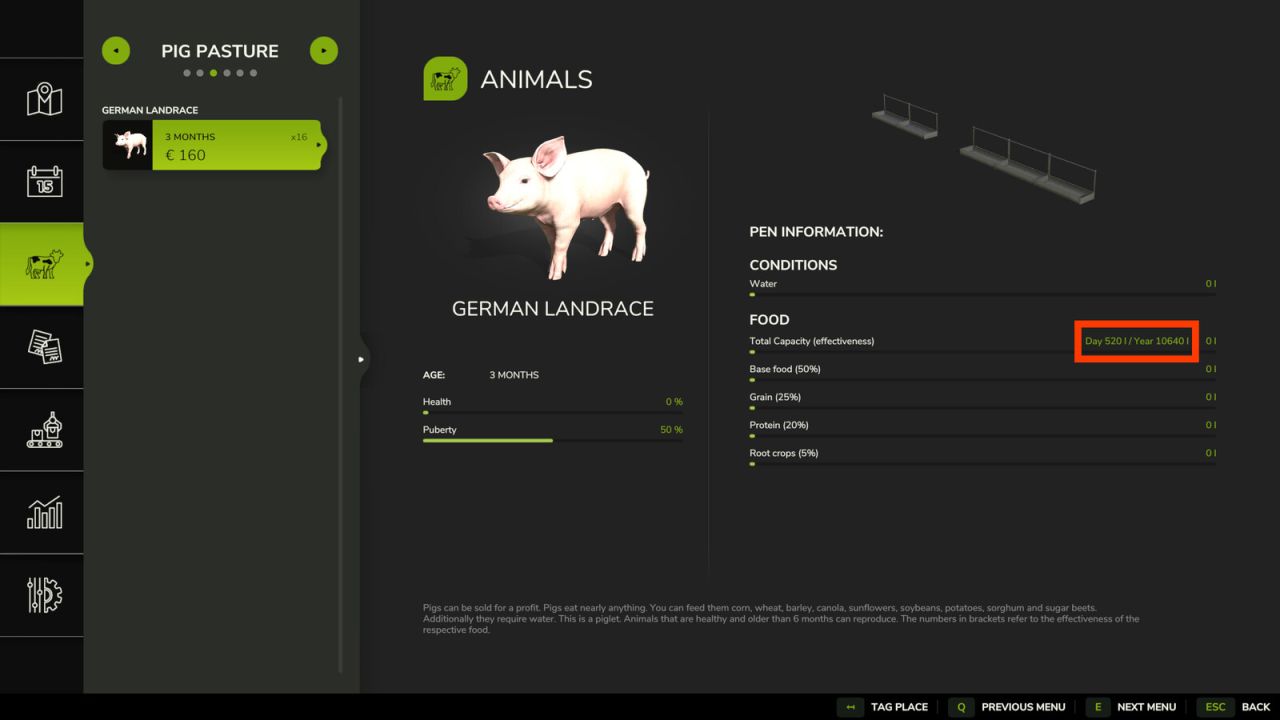
AFC shows directly in the animal menu what your animals consume and produce. Depending on the animal type and husbandry, this can include food, water, straw, milk, manure, slurry, wool, eggs or goat milk.
In short:
You no longer have to guess whether your cows will still have feed tomorrow, or whether the barn has secretly become a slurry factory.
AFC now also shows when your animals reach their best selling price. This helps you decide directly in the animal menu whether it is worth keeping them longer or whether it is time for a trip to the animal dealer.
Important:
AFC does not automatically change animal consumption, production, prices, shearing times or husbandry capacities.
These values remain unchanged unless you deliberately enable or adjust the corresponding AFC features yourself.
This makes AFC useful for players who simply want a better overview, and also for players who want to tune animal husbandry more closely to their own play style.
From a relaxed evening farm to a fully calculated agricultural operation:
You decide how deep you want to look into the feed trough.
1. Input and output display
AFC shows directly in the animal menu which amounts your animals consume and produce.
This lets you see at a glance what is really going on in the barn:
– How much food is being consumed?
– How much water do the animals need?
– How much straw disappears into the barn every day?
– How much milk, manure, slurry, wool, eggs or goat milk is produced?
The display helps you estimate supplies, storage, feed planning and production amounts more easily.
Depending on the animal type, husbandry and active mods, different values may be shown.
AFC uses the actually available animal data and only displays values that make sense for the selected husbandry and animal type.
No invented values, no crystal ball, no “it will probably be fine”.
AFC checks what is really there.
2. Animal Value Advisor
AFC additionally shows in the animal overview when your animals reach their best selling price.
A short hint appears directly next to the current animal value:
-X means: the best selling price will be reached in X months.
TOP means: the animal is currently in the best price range.
+X means: the animal is already X months beyond the best price range.
Example:
– 6 = 6 months until the best price
TOP = the optimal selling range has been reached
+4 = 4 months beyond the best selling range
The display also supports price plateaus. If an animal has the same highest selling price for several months, the entire period is shown as TOP.
So you no longer have to decide by gut feeling whether an animal may keep growing, eating and staring at you expectantly — or whether the economics are already waving toward the animal dealer.
The Animal Value Advisor uses the currently active reference source. If you switch between Map, Custom, Basegame or AnimalPackage, the purchase prices, selling prices, transport costs and displayed best selling time change accordingly.
3. Select reference source
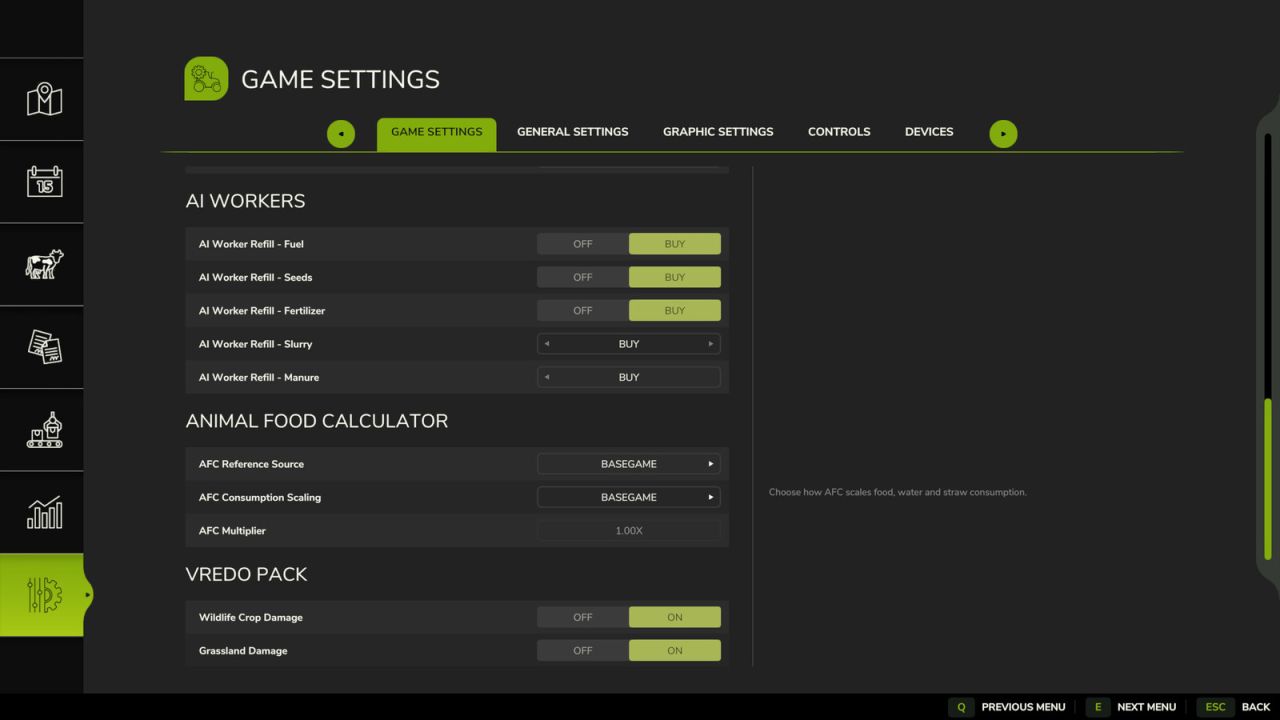
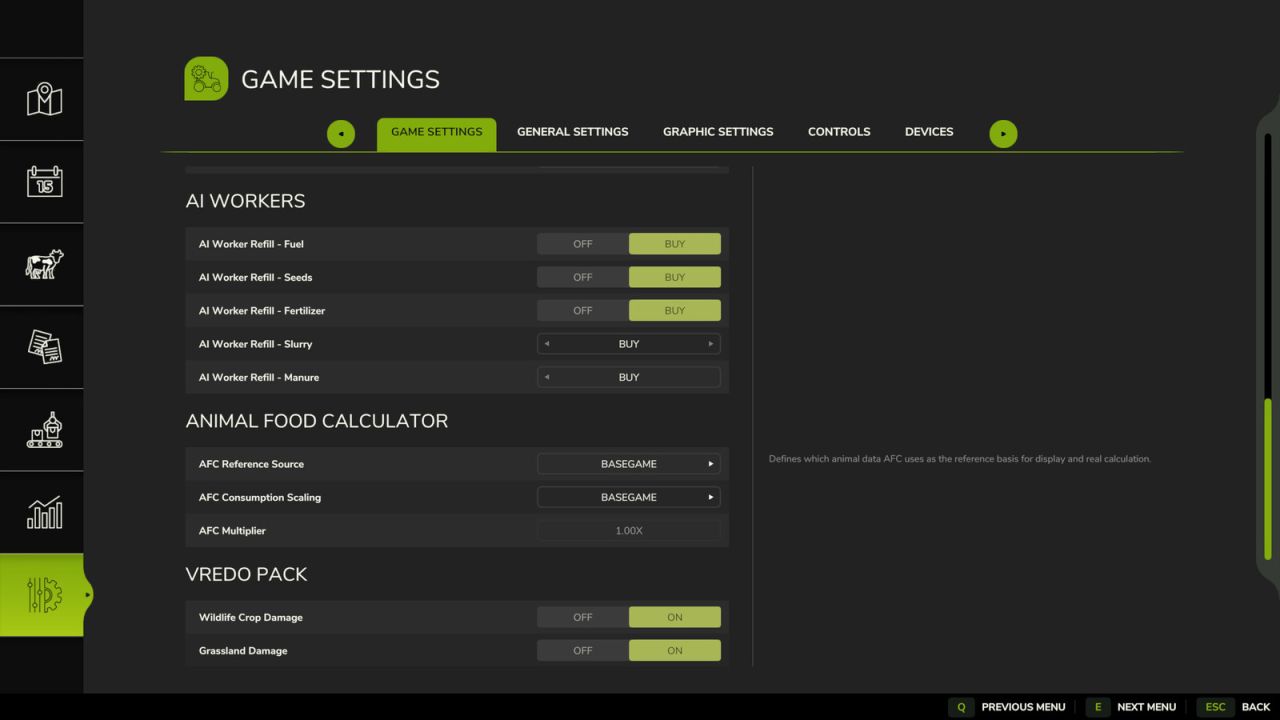
AFC can read animal values from different sources.
The reference source determines which animal data AFC uses as the basis for display, calculation, scaling and animal prices.
This is especially important when playing with mod maps, custom animal values or the AnimalPackage.
Available reference sources:
Basegame:
AFC uses the animal values from the base game. This setting is useful if you want to stay as close as possible to the standard FS experience.
Map:
AFC uses the animal values from the currently played map, if the map provides its own animals.xml.
This is especially useful for mod maps with their own animal balancing.
AnimalPackage:
AFC uses the values from FS25_AnimalPackage_vanillaEdition by BavarianRedneck.
If the AnimalPackage is active, its animal types and values are handled accordingly.
Custom:
AFC uses its own animals.xml directly from the mod.
This option is intended for players who want to deliberately adjust their animal values without changing the map or other mods.
AFC checks whether a reference source matches the animal SubTypes of the currently played map.
If a map uses its own animals or different SubTypes, incompatible references are not offered.
This prevents AFC from trying to calculate animals with data that does not know those animals at all.
In other words: if the map brings a special animal, AFC will not ask the base game for values for an animal the base game has never heard of.
The Custom reference is also only offered if it fully contains all SubTypes of the map.
If matching entries are missing, the Map reference remains the default values.
4. Scale inputs and outputs
In addition to the display function, AFC can optionally scale the actual in-game inputs and outputs.
This feature is optional and must be deliberately selected in the AFC settings.
This allows you to adapt animal husbandry to your own play style:
– play more relaxed
– manage more realistically
– balance larger farms better
– make longer months more useful
– set consumption and production higher or lower
AFC provides several scaling modes:
Basegame:
No additional AFC scaling is applied. AFC uses the selected reference source but does not calculate an additional factor. The multiplier is effectively 1.0.
Auto:
AFC scales automatically based on the selected days per month.
If you play with more days per month, animals can consume and produce more over the course of the month.
Manual:
AFC only uses the multiplier selected by you.
Days per month are not included automatically.
This setting is useful if you want full control over the strength of the scaling.
Hybrid:
AFC combines both systems. Values are scaled according to the selected days per month and additionally adjusted by your own multiplier.
This is the most flexible option for players who want to tune their balancing very precisely.
In short:
You can let AFC politely nod along, or hand it the calculator.
5. Own animals.xml in the mod
For players who want to adjust their own animal values, AFC includes its own animals.xml inside the mod.
This file can define custom reference values for consumption, production and animal prices. These values can then be used through the Custom reference source.
Depending on the animal type, the Custom file can contain values for:
– food
– water
– straw
– milk
– manure
– slurry
– wool
– eggs
– goat milk
– purchase price
– selling price
– transport costs
When Custom is active as the reference, consumption, production and animal prices form one shared AFC balancing profile. The Animal Value Advisor then uses the Custom prices as well.
This is especially useful if you want to use your personal balancing without directly changing the map, the base game or other animal mods.
Or in plain farm language:
The map stays clean, AFC does the math, and the animals keep pretending none of this concerns them.
6. Compatibility with EnhancedAnimalSystem and AnimalPackage
AFC is designed for use with EnhancedAnimalSystem and FS25_AnimalPackage_vanillaEdition.
With EnhancedAnimalSystem, AFC takes supported additional logic into account, such as lactation factors, so the display and calculations better match the extended animal behavior.
With AnimalPackage, AFC recognizes the additional animal types and matching animal values.
This allows animals added or adjusted by AnimalPackage to be properly included in display, reference selection, calculation and animal values.
The goal is simple:
If your animals become more complex through mods, AFC should not stand confused in the corner counting corn.
7. Seasonal Wool
Seasonal Wool is an optional AFC feature and must be enabled in the settings.
When Seasonal Wool is active, sheep wool is no longer simply produced evenly throughout the year.
Instead, wool grows in the background and is only released in the correct shearing month for the respective breed.
This creates a more realistic feeling, because wool no longer appears constantly in tiny amounts, but is produced at specific times depending on the breed.
If a farm keeps sheep of a shearable breed, an in-game notification appears in the respective shearing month.
It reminds you to keep the pallet spawner clear.
After all, even the hardest-working sheep cannot push a pallet through a wall.
On mod maps with pastures that do not have their own pallet space, sheep should be moved to a barn in time so the wool can be released there.
When moving sheep between barn and pasture, collected wool is not lost.
If the pallet spawner is full, the remaining wool amount is kept and will spawn later once there is space again.
Seasonal Wool supports the base game sheep as well as the sheep breeds from FS25_AnimalPackage_vanillaEdition.
Shearing periods base game:
– Bentheim Landrace: June
– Black Welsh Mountain: June
– Alpine Steinschaf: May and October
– Swiss Black-Brown Mountain: May and October
Shearing periods AnimalPackage:
– Merino: June
– Suffolk: June
– Steinschaf: May and October
8. AFC Husbandry Capacities
With AFC, you can adapt animal consumption and production values to your own play style.
This can make the original storage capacities of some husbandries too small, depending on your settings.
At the same time, some husbandry capacities are very generous for more realistic play styles.
AFC Husbandry Capacities is an optional feature per husbandry and is set to Off by default.
Through the animal menu, you can define how long the available storage should last for each supported husbandry.
Depending on the husbandry, supported storages are:
– food
– water
– straw
– milk
– manure
– slurry
The function works dynamically: AFC calculates the required capacities from the current animals, the selected AFC reference values and the active scaling.
If there are more animals in the husbandry, higher consumption or production values apply, or AFC scaling is increased, storage capacities can automatically grow with them.
Capacities are only increased automatically. Lower values are only applied when you open the AFC Husbandry Capacities menu again and deliberately confirm with “Save & apply”.
Existing contents are not removed or deleted.
AFC will not secretly pour milk, slurry or feed into the digital void.
Food, water, straw, milk and built-in manure heaps are planned in game days.
Slurry is planned by months of production.
Externally connected manure heaps are deliberately not changed from the husbandry and therefore do not have their own month setting in the AFC Husbandry Capacities menu.
Pallet storage and pallet outputs from sheep, goats and chickens cannot be adjusted with this feature.
The feature only appears for husbandries where AFC can adjust matching storage capacities.
Husbandries without suitable storage, with automatic water supply or without supported storage types are skipped accordingly.
In short
AFC is first and foremost a tool for a clearer overview of animal husbandry.
You can see more clearly:
– what your animals need
– what they produce
– when they reach their best selling price
– which reference values are active
– and whether your storage capacities still fit the selected balancing
Beyond that, you can use AFC to fine-tune animal husbandry to your play style:
simple, relaxed and clear — or detailed, realistic and demanding.
You decide which features you use.
AFC counts.
You play.
The animals pretend everything is perfectly normal.
V1.2.0.0
– Added new optional Seasonal Wool feature.
– Added new optional AFC Husbandry Capacities feature.
– Added new Animal Value Advisor.
– AFC now shows in the animal overview when animals reach their best selling price.
– Purchase prices, selling prices and transport costs now also follow the selected reference source.
– Extended custom animals.xml with custom animal price profiles.
– Extended custom animals.xml with additional animal SubTypes from the map Le Mechet.
– Added reference guard for mod maps with custom animal SubTypes.
– Incompatible reference sources are no longer offered if they do not fully support the animals on the current map.
– Fixed the pallet storage display in chicken and sheep husbandries after loading a savegame and joining/rejoining in multiplayer.
– Completely reworked the mod description.
– Added support for animal configurations using parentFile.
– Added Brahman cattle to the AFC Custom reference.
– Added support for alpaca consumption calculations and food storage capacity settings from the Beans & Alpacas DLC.
– Alpacas now accept fresh clover and alfalfa, as well as their hay, when the map provides these fill types.
– Fixed missing animal menu buttons and conflicting key assignments when using the Animal Worker and EAS.
– Added dedicated AFC Custom curves for alpaca food and water consumption, as well as straw and manure reference curves for future compatible husbandries.
– Fixed duplicate predecessor processing in the water hook and missing output in husbandries with multiple milk types.
Author: [Weekend Farmers]