
Employees v1.0
Employees v1.0
Employee Management: Up to 10 permanent employee profiles, each with their own name, age, and assigned AI helper.
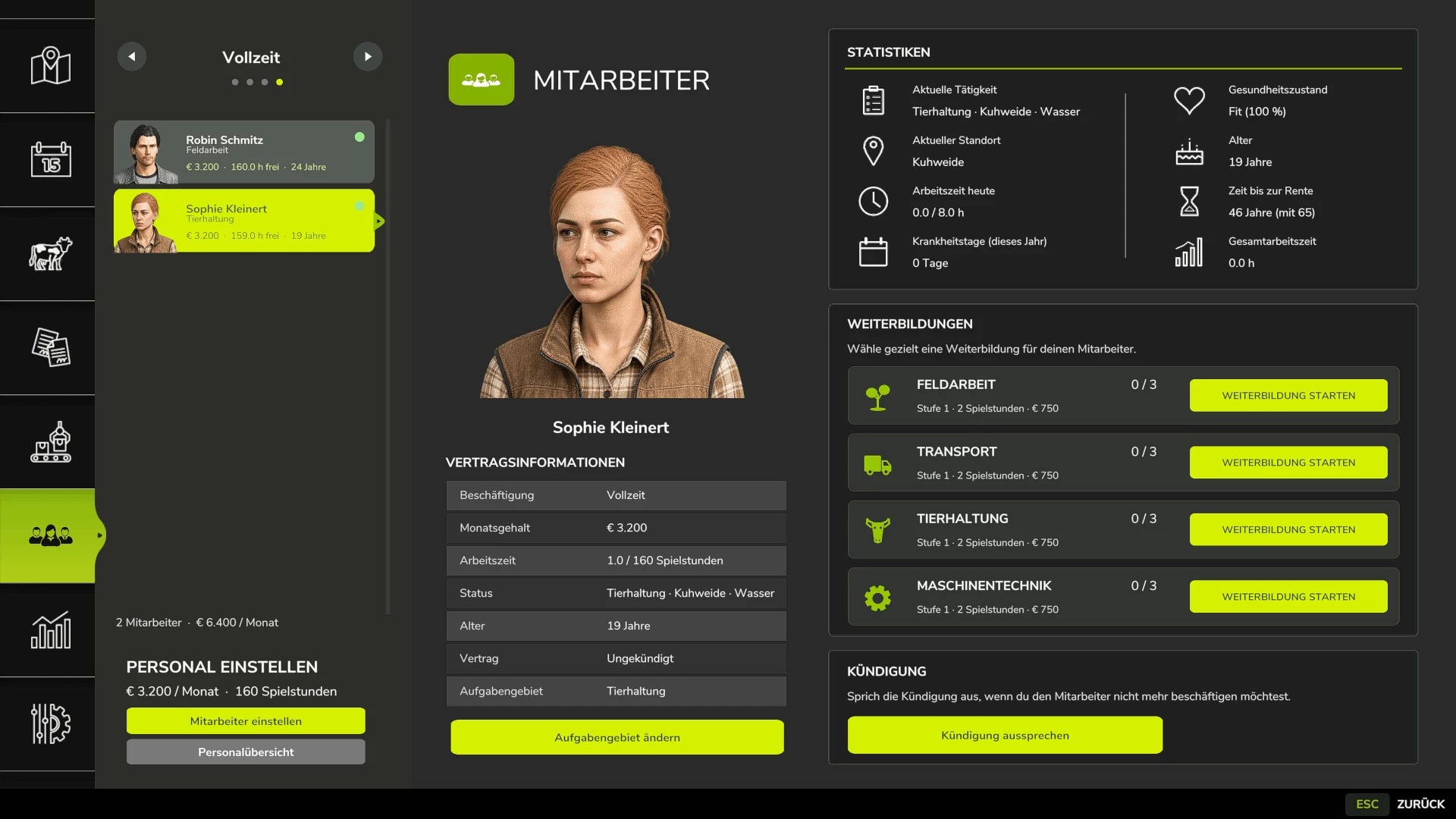
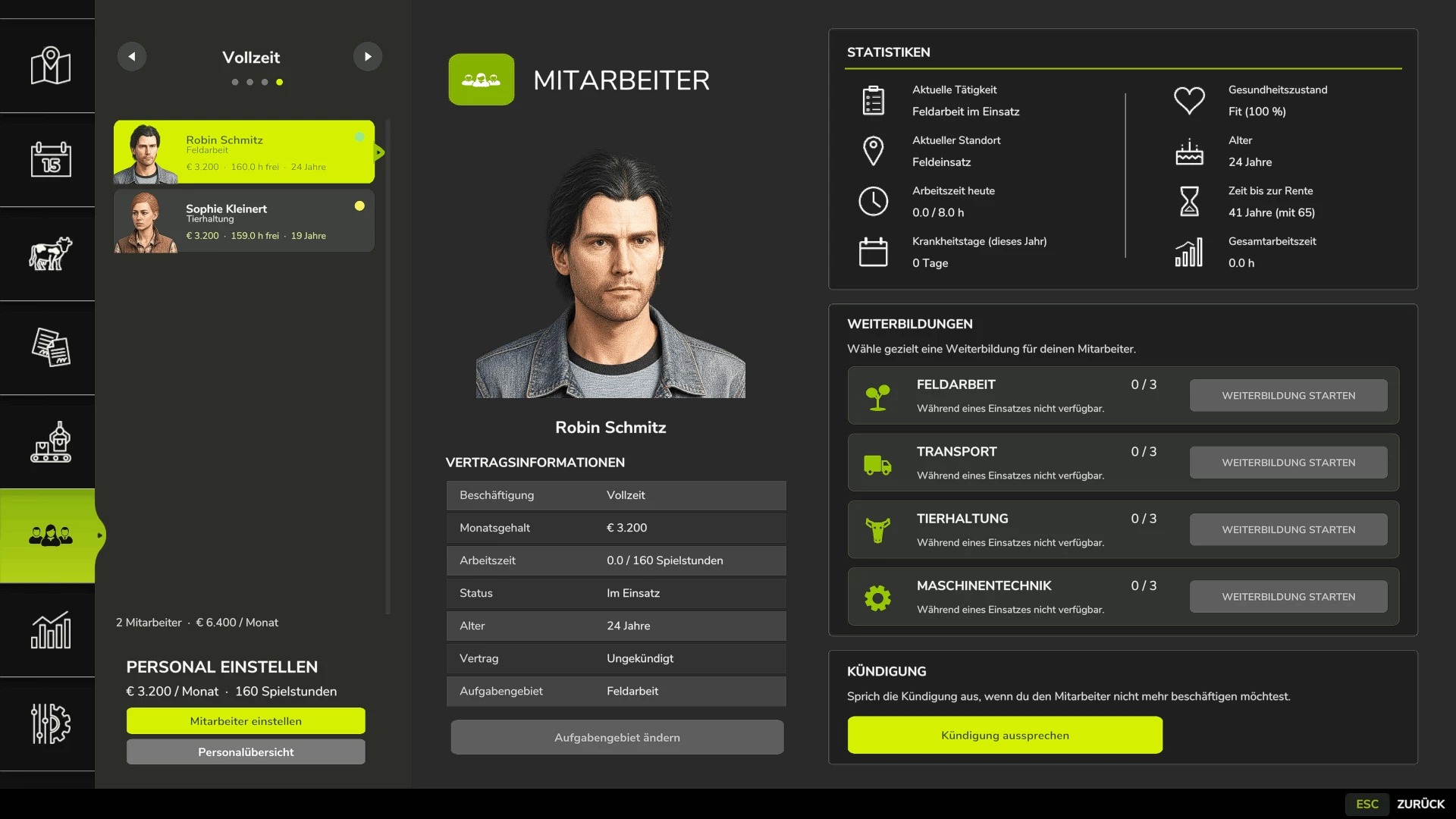
1. Four contract types: Minijob for €600/month and 40 gameplay hours, part-time for €1,600/month and 80 hours, full-time for €3,200/month and 160 hours, and temporary workers for €120 per assignment.
2. Temporary workers: Available for 8 gameplay hours after being requested, after which they automatically leave the farm. They cannot receive training and always work at full performance level.
3. Areas of responsibility: Each employee can be assigned to fieldwork, transport, animal care, or machinery maintenance. New employees start as “Unassigned.”
4. AI helper integration: Fieldwork jobs are assigned only to employees with the fieldwork role; GoTo, delivery, conveyor belt, and transport jobs require the transport role.
5. Employee selection in singleplayer: When starting a suitable AI job, a selection of available employees is displayed.
6. Automatic selection in multiplayer: In multiplayer, a suitable employee is selected automatically, with preference given to the employee who has used the lowest percentage of their available monthly hours.
7. Real employee names: Instead of “AI Worker A/B/C…”, managed jobs display the actual employee’s name.
8. Working hours: Regular employees use up their monthly hour allowance while performing AI jobs. Once the allowance is exhausted, the job is stopped.
9. Monthly salaries: Salaries are deducted at the change of each month. At the same time, regular employees’ monthly working-hour allowances are reset.
10. Dismissals: An employee can be dismissed. Their employment ends after three month changes, and the dismissal can be withdrawn before then.
11. Aging: Employees age as the in-game months pass.
12. Retirement: Employees retire at the age of 65. A warning is issued three months beforehand. The vacated employee slot can later be filled again with the employee’s original starting age.
13. Illnesses: Regular employees have a 3% chance per month of becoming ill.
14. Four illnesses: Cold, gastrointestinal illness, flu, and back problems, each with different recovery times.
15. Recovery in gameplay time: Illness duration is measured in gameplay hours. Sick employees cannot be assigned to work or training, and any ongoing jobs or maintenance tasks are stopped.
16. Training: Fieldwork, transport, animal care, and machinery maintenance each have 3 training levels.
17. Training costs: Level 1 costs €750, Level 2 costs €1,500, and Level 3 costs €2,250.
18. Training duration: The three levels take 2, 5, and 8 gameplay hours respectively.
19. Performance levels: Without training, a regular employee works at 25% efficiency, increasing to 50%, 75%, and 100% with each training level.
20. Fieldwork and transport: Training level affects the actual AI driving speed or the vehicle’s speed limit.
21. Animal care and machinery maintenance: Higher training levels reduce the amount of time required for these tasks.
22. Automatic animal checks: An animal caretaker automatically checks animal facilities at 08:00 and 17:00.
23. Occupied facilities only: Empty barns and pastures are skipped.
24. 20% threshold: Feed, water, and bedding are replenished only when the respective level falls below 20%.
25. 95% target: The animal caretaker then attempts to refill the resource to 95%.
26. Fair feed distribution: If there is not enough feed available, all animal facilities in need are considered together instead of the first facility found receiving everything.
27. Feed from farm storage: The mod searches for usable feed in regular silos, silo extensions, bale storage, pallet storage, BigBags, ObjectStorages, and other supported storage types.
28. Hof Bergmann support: The storage logic supports the special Hof Bergmann pallets and ObjectStorages.
29. Pet food: Special fill types such as dog and cat food can also be supported.
30. Water: The animal caretaker fills suitable water troughs directly and free of charge. No water is deducted from farm storage.
31. Bedding: The mod recognizes both straw and WOODSHAVINGS/wood shavings, depending on what the specific animal facility supports.
32. Wood shavings on Hof Bergmann: Stored wood-shaving pallets in ObjectStorage can also be detected and used as available stock.
33. Inventory protection: If feed or bedding is not accepted by the animal facility, the mod attempts to return the reserved amount to storage instead of simply deleting it.
34. Manure: Existing manure is moved to the nearest reachable manure heap belonging to the same farm.
35. Farm separation: Automatic supply management only uses storage and animal facilities that the respective farm has access to.
36. Machinery technician: Works automatically between 08:00 and 17:00.
37. Repair threshold: Vehicles with approximately 20% damage or more are selected for maintenance.
38. Vehicle selection: Preference is given to a damaged vehicle owned by the farm that is not currently being driven, is stationary, and has no active AI job.
39. Maintenance duration: The duration depends on the machinery technician’s training level and only progresses during working hours between 08:00 and 17:00.
40. Vehicle lock during maintenance: The vehicle cannot be entered, tabbed into, used, or normally attached to equipment while maintenance is in progress.
41. Repair information: The vehicle information display includes details such as the remaining repair time.
42. Repair costs: Before maintenance begins and again upon completion, the mod checks whether the farm can afford the repair.
43. Employee overview: The employee menu displays employees by contract type and area of responsibility, together with their status, age, remaining hours, and additional contract information.
44. Status indicators: These include “Available,” “Working,” “Training,” “Sick,” “Hour Limit Reached,” maintenance tasks, and “Assign Area of Responsibility.”
45. Multiplayer: The main employee-management logic runs server-side.
46. Multiplayer synchronization: Employees, contracts, working hours, age, roles, training, illnesses, active AI jobs, and maintenance tasks are synchronized with clients.
47. Farm security in multiplayer: A client may perform management actions only for employees belonging to their own farm.
48. Synchronized actions: Hiring, changing an employee’s area of responsibility, starting training, dismissal, and cancellation of dismissal are sent to the server.
49. Multiple farms: Animal care and machinery maintenance are managed separately for each farm in multiplayer.
50. Savegame support: Employees, progression, illnesses, training, maintenance tasks, and animal-check times are stored in a dedicated `employees.xml` file.
Author: -


dont work ;(