Factory Week Schedule v2.0
Factory Week Schedule v2.0
Controls production chains by day of the week and time of day. Factories can be automatically opened or closed without having to modify production files.
V2.0
Time System Combined realtime & game-time mode with centralized control
Calendar Real weekday system (Mon–Sun) integrated
Integration GlobalTime system fully integrated
Architecture Completely reworked, single core system
Weekly Schedule Individual working times for each weekday
Worker System Workers, efficiency, wages, production impact
Worker Events Illness, vacation, employee turnover
Training Workers improve over time
Factory Events Maintenance, breakdowns, inspections, overproduction
Production Material monitoring & auto-pause
Costs Dynamic wage system
HUD Movable, scalable, customizable
Save System Map-based settings & event persistence
Multiplayer Enabled
Performance Optimized, no duplicate systems
Compatibility Reduced conflicts with other mods
Important Note
The mod FS25_GlobalTimeCore is no longer required
Please remove it from your mods folder
V1.2
GlobalTimeCore Support Soft dependency added
Compatibility Works with or without GlobalTimeCore
Realtime Mode Uses only real-world time, real date, real month and real clock
Game Mode Displays real date, real time, in-game time and in-game month
Production Logic Factories run according to real time in realtime mode
Production Logic Factories run according to in-game time in game mode
XML System timeSystem corrected to use mode + keepGameClockUntouched
XML Structure eventSystem and factoryEvents restored in default XML
Backward Compatibility Older XML formats with incorrect attributes still recognized
HUD Improved time system and factory status display
Status Colors Open = green, Closed = red, Closing soon = orange, Opening soon = yellow, Maintenance = orange, Failure/Event closed = red
Default Shifts Saturday default shift corrected to 9–19
Stability Lua syntax and compiler errors fixed
Manufacturers can automatically open or close factories without requiring any changes to production files.
Mod Overview
Overview
Feature FS25_GlobalTimeCore FS25_FactoryWeekSchedule
Days of the week in the game (Mon-Sun) ✔ uses this
Global time and day system ✔ uses this
Real-time mode possible ✔ uses this
Show day of the week in the HUD ✔ Extended display
Date + time with seconds ✔ Shows production times by day of the week in the production HUD – ✔
Automatic factory detection – ✔
No changes to production XML required – ✔
Production stop by time – ✔
Different times per day – ✔
Completely closed on Sundays possible – ✔
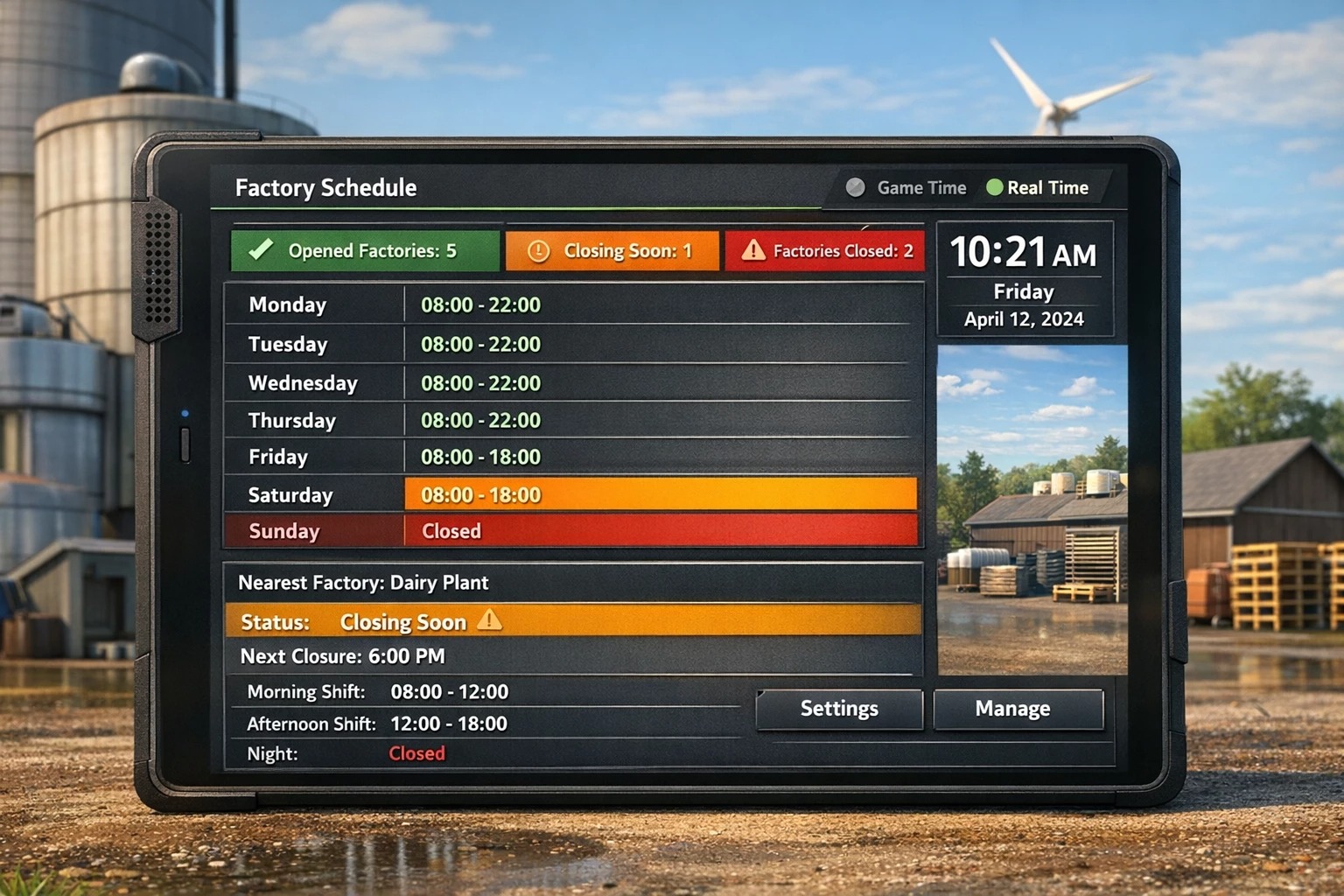
Display open/closed factories – ✔
Display of the next closure – ✔
Display of the factory nearest you – ✔
Real-time or game time selectable ✔ ✔ Configuration via modSettings XML ✔ ✔
Closing times adjustable via XML – ✔
Time mode
The mod supports two time modes:
Mode Description
Game Time: Uses the normal game time. Time fast-forwarding works as usual.
Realtime: Uses the real PC time and the real day of the week. Game time fast-forwarding has no effect on production times.
The time mode can be changed in the modSettings XML file.
Game Time: Uses the real PC time and the real day of the week.
Example XML
Code
<factoryWeekSchedule>
<timeSystem mode=”game” />
</factoryWeekSchedule>
or
Code
<factoryWeekSchedule>
<timeSystem mode=”realtime” />
</factoryWeekSchedule>
Example Working Hours
Day Production Time
Monday until 10:00 PM
Tuesday until 10:00 PM
Wednesday until 10:00 PM
Thursday until 10:00 PM
Friday until 6:00 PM
Saturday until 6:00 PM
Sunday closed
All times can be adjusted in the modSettings XML file.
Author: Akita83