FS2011 HUD Style (Addon for Zasty HUD) V1.0
FS2011 HUD Style (Addon for Zasty HUD) V1.0
Zasty HUD FS 2011 Style (Addon)
Play FS25 with the HUD of Farming Simulator 2011!
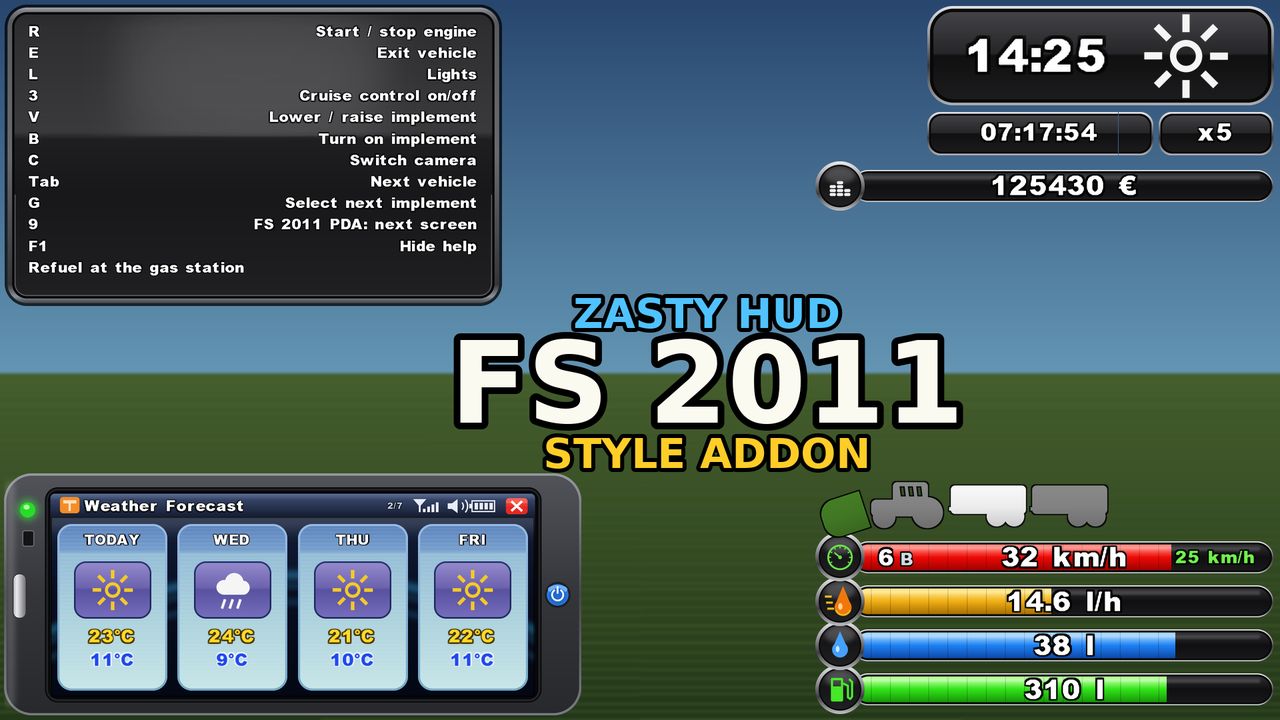
This addon for Zasty HUD (by Zasty Chalk) adds a third style, “FS 2011”, next to “Bar” and “Round” in the Zasty HUD settings window. While it is active, the FS 2011 HUD fully replaces the FS25 HUD, so nothing overlaps.
FEATURES
Bars (bottom right)
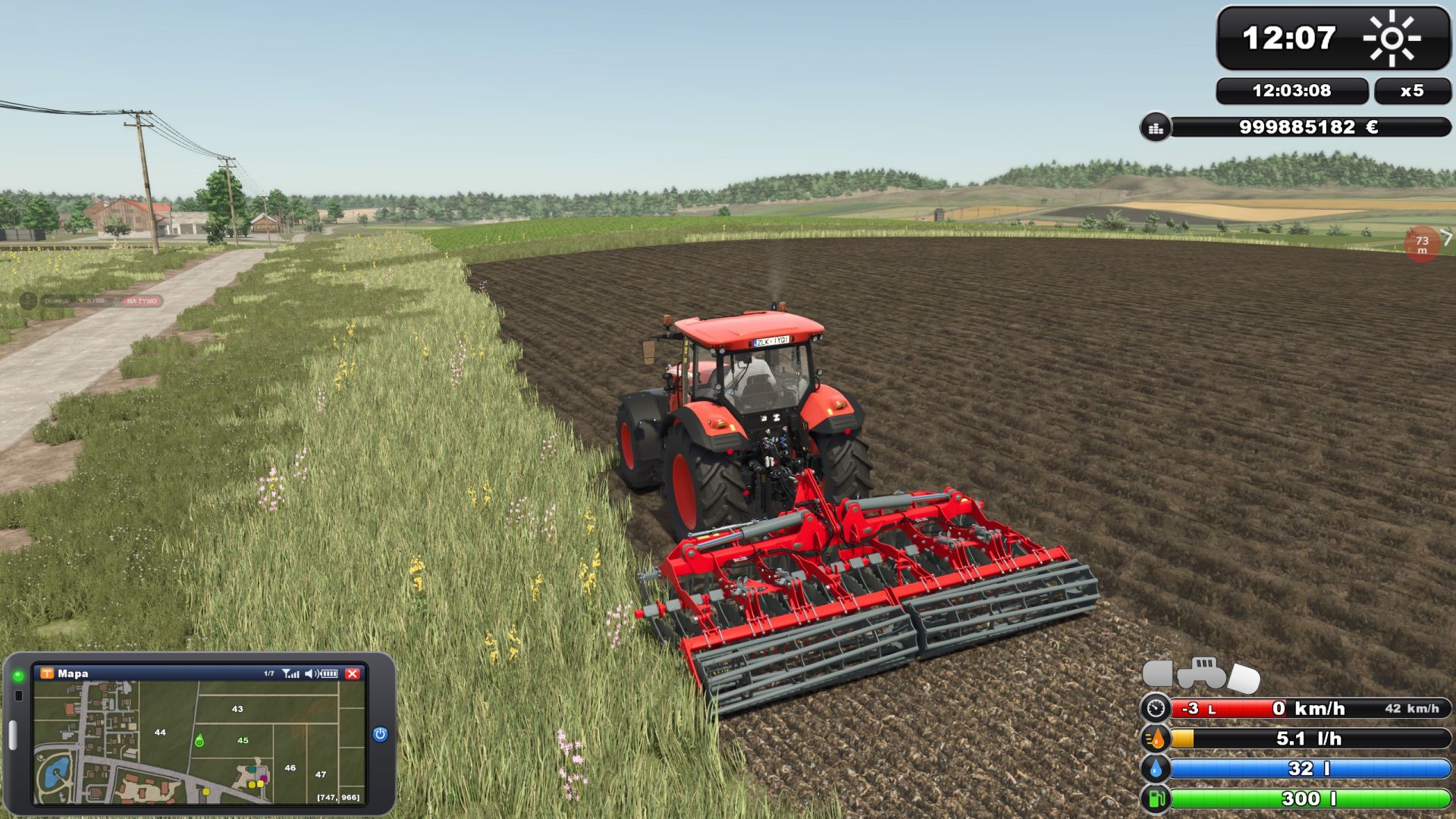
The classic FS 2011 bar stack: speed, fuel consumption (l/h), AdBlue and fuel
Speed bar: the red fill shows the engine rpm, gear and gear group on the left, set cruise control speed on the right; the speed icon turns green while cruise control is on
Fuel consumption in litres per hour (0 when the engine is off)
Blue AdBlue / DEF bar when the vehicle has a DEF tank (base game and AdBlue mods)
Vehicle schema above the bars: tractor with front and rear implements. Switched on (B) = green, selected (G) = brighter, lowered = tilted towards the ground
Clock (top right)
FS 2011 clock with weather symbol
Real (computer) time and time scale below it
Your balance under the clock, on foot and in vehicles
PDA (bottom left)
Replaces the FS25 minimap. The game’s minimap key (9) switches the PDA screens (Left Alt + I works too), one more press hides it, every change gives the PDA beep
Map: north up, heading marker, coordinates, field numbers (your fields in green) and the game’s icons for the shop, selling points, productions and animals
Weather Forecast: today and the next three days on FS 2011 day cards (symbol, max and min temperature)
Prices: best price for each crop
Statistics: silo storage and animals
Players: multiplayer only
Vehicles: tractor with all implements and trailers, state and fill levels
Engine: rpm, load, temperature, gear, direction, speed, operating hours, fuel, AdBlue, consumption, damage, wear, total mass
Tyres: with the Variable Tire Pressure mod (front axle, rear axle, trailer, road/field, inflating/deflating)
Farm: date, time scale, balance, field, crop, vehicles, farmlands, play time
PDA size in the Zasty HUD window (row “PDA size”, 40-100 %), changes live
F1 help
One glossy FS 2011 box: key on the left, action on the right; grows with the number of actions
In build mode, the shop and menus it moves to the right side
More
The whole FS25 HUD it replaces is hidden: speedometer, minimap, fill levels, vehicle schema, time/money box (notifications and warnings stay)
Variable Tire Pressure: its window is hidden, the pressures are on the PDA (its control panel Ctrl+Alt+U still works)
Languages: EN, DE, PL, FR, ES, IT, PT/BR, CZ, RU, NL, HU, TR. The addon also translates Zasty HUD itself into these languages and fixes its language detection in FS25 (Zasty HUD’s files stay unchanged)
Speed, volume and money follow your game settings (km/h / mph, litres / gallons, currency)
Bars and clock follow the “Size” setting of the Zasty HUD window
REQUIREMENTS
Zasty HUD (FS25_ZastyHUD), installed and active
HOW TO USE
1. Put FS25_ZastyHUD_FS2011.zip into your mods folder next to FS25_ZastyHUD.zip
2. Activate both mods in your savegame
3. Press Left Alt + H and choose Style: FS 2011
4. Press 9 (or Left Alt + I) to switch the PDA screens
NOTES
Zasty HUD’s own files are not changed. Remove this addon and Zasty HUD works as before (a saved “FS 2011” style falls back to “Round”). With Bar or Round the minimap key works as usual.
Client side only, single player and multiplayer. Where the game gives no consumption figure (e.g. multiplayer clients) it is measured from the falling fuel level.
The forecast is read from the game when available; otherwise the Weather Forecast screen shows today only.
Other mods that change the game HUD may overlap. Please report problems with your log.txt.
Zasty HUD: Zasty Chalk
FS 2011 style addon: Siemanek
Original HUD design: GIANTS Software (Farming Simulator 2011), redrawn for this addon
Required mods:
Zasty HUD
Author: Siemanek, zasty chalk