Griffin Thunderbuild NLM Edit V1.0
Griffin Thunderbuild NLM Edit V1.0
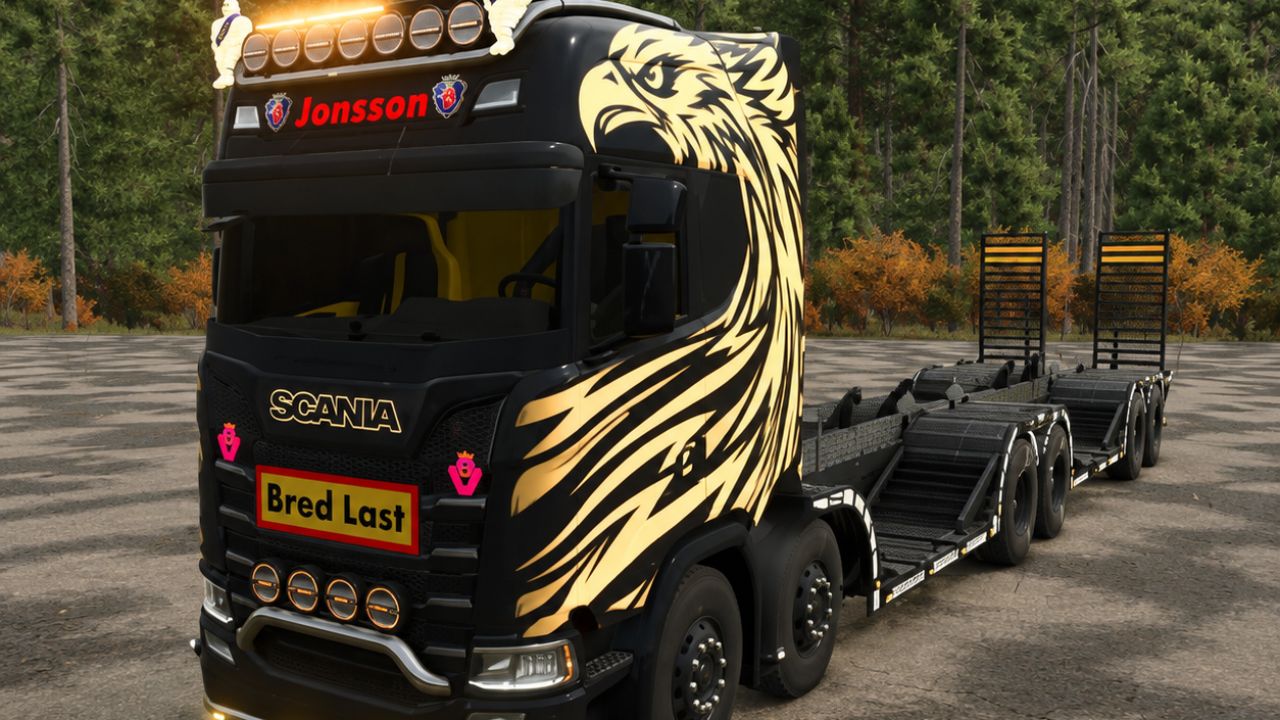
A configurable forestry machinery transporter with loading ramps, tension belts, custom lighting and selectable exterior and interior styling.
Specifications:
Base price: €260,000. Selected configurations cost extra.
Engine options: 520, 580, 650, 730 and 1,200 hp.
Configured driving speed limit: 83 km/h.
Diesel tank capacity: 490 litres.
Configurations and features:
Selectable body, interior, rim and decorative colours.
13 skin/decal configurations, including Royal Griffin, Swedish Edition, V8 Elegance and Thunder Black.
Griffin or Scania branding.
Clear or tinted windows.
Multiple bar and cab-accessory configurations.
Front auxiliary lights: OZZ XR2 P9 with amber or white DRL, Lazer Sentinel 9 Elite, or Strands DragonDrive 220.
Seven roof-mounted and four front-mounted auxiliary lamps when both bars are fitted.
Strands Big Energy XL beacon available through the bar configurations.
Five rear work lights: LuminaLights Power X or Strands Siberia Red Panda.
Illuminated Jonsson sign, Scania shields, selectable V8 badges, Viking position lights and warm-white front-lettering backlighting.
Dynamic engine sound and an interior rear-camera display.
All included lamps are already fitted and connected. No separate lamp downloads are required. Choose both the desired mounting bars and the lamp model in the shop. See the included English lighting README for setup and controls.
Rear camera requirement:
The live rear-camera image requires Mercedes-Benz Trucks Pack version 1.2.0.0 or later, installed and enabled for the savegame. The engine must be running. Without this pack, the truck remains usable, but the camera screen stays off.
Required mods:
Mercedes-Benz Trucks Pack
Author: NorthernLightModding, North Modding Company, Agro Mods, piplarsson - Swedish Bonna Team, Erik Isac, Luís Sounds, Lantmanenfs, Norrgårdens Modding and Paint, BlackBettyModding, MaanTieBanaani