Mercedes-Benz Agrar Truck Tanker v1.0.0.3
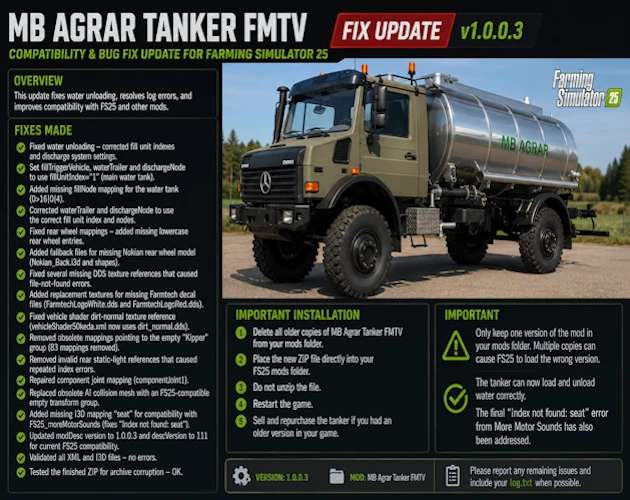
Mercedes-Benz Agrar Truck Tanker v1.0.0.3
MB Agrar Tanker FMTV — Community Fix
The original mod was published by Farm Mods TV as version 1.0.0.0 and includes engine, capacity, body-color, tanker-color, bull-bar-color, and rim-color options. Original credits also list 50keda, CebuljCek, Agroni99, and Turbo Modding.
Fixes Made
Fixed the tanker being able to load water but not unload it.
Corrected the main water tank fill-unit index.
Corrected the water-trailer fill-unit index.
Corrected the discharge-node fill-unit index.
Added the missing water tank fillNode mapping.
Corrected the discharge system’s node references.
Fixed missing rear-wheel mappings.
Added the required lowercase rear-wheel mapping entries.
Added fallback files for the missing Nokian rear-wheel model.
Fixed multiple missing DDS texture references.
Added replacement files for missing Farmtech decal textures.
Corrected the vehicle shader dirt-normal texture path.
Removed obsolete mappings connected to the empty Kipper transform group.
Removed broken rear static-light references.
Reduced repeated light-node and index errors in the game log.
Repaired the component-joint mapping.
Replaced the obsolete AI collision mesh configuration with an FS25-compatible empty transform group.
Updated the AI collision-trigger configuration.
Added the missing seat I3D mapping required by More Motor Sounds.
Fixed the Error: Index not found: seat log error.
Updated the mod version to 1.0.0.3.
Updated descVersion for current FS25 compatibility.
Validated the XML and I3D files.
Tested the finished ZIP for archive corruption.
Credits and Disclaimer
This is an unofficial community fix. I am not the original creator of the vehicle, model, textures, or original mod.
All original credits go to Farm Mods TV.
This community update only addresses FS25 compatibility issues, including water unloading, XML mappings, missing textures, wheel references, lighting errors, AI collision configuration, More Motor Sounds compatibility, and game-log errors.
Author: SecondChanceGaming3709