SiloEntryAlert v1.0
SiloEntryAlert v1.0
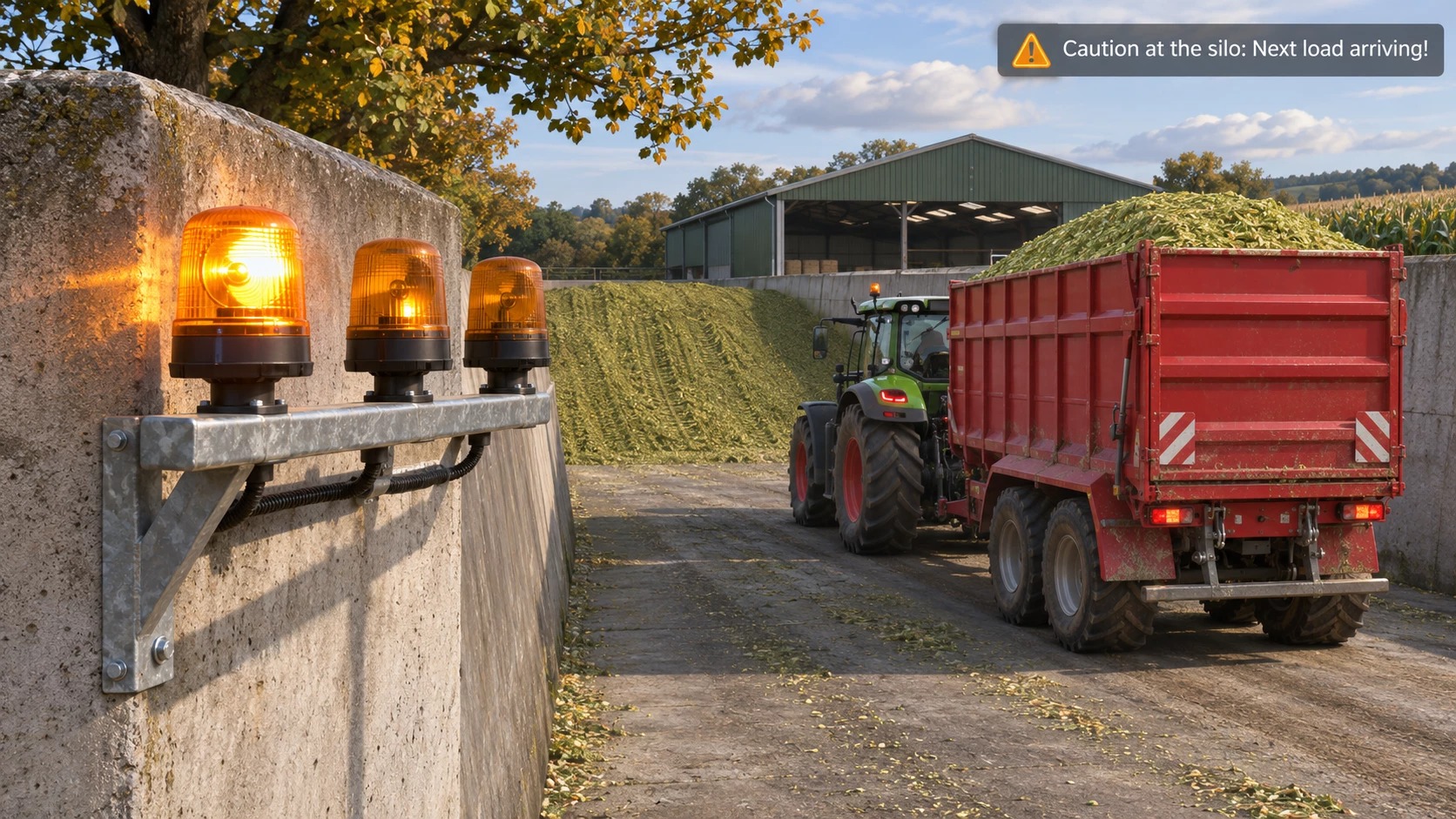
Silo Entry Alert (Placeable) for LS25: Simply place it via the in-game construction menu at the entrance to your farmyard or silo. As soon as a vehicle passes through the trigger, three classic rotating beacons will automatically activate for 25 seconds, and an in-game notification will appear. Fully compatible with single-player, multiplayer, and dedicated servers.
Silo Entry Alert / Farmyard Entry Alert (FS25_SiloEntryAlert) – Version 1.0.0.0
The Silo Entry Alert adds realism and safety to your bunker silo or farmyard entrance—all without needing the GIANTS Editor. Whenever a transport vehicle or any other machine passes through the entry trigger, the rotating beacons activate automatically, alerting anyone working at the silo that another load is arriving.
The mod can be easily placed on any map using the in-game construction menu and is fully compatible with single-player, multiplayer, and dedicated server environments.
Features at a glance:
Easily placeable on any map:
No GIANTS Editor required—simply purchase it via the in-game construction menu and place it right at your farmyard or silo entrance.
Automatic rotating beacons at the silo:
Three classic rotating beacons activate automatically for 25 seconds when a vehicle passes through.
Features synchronized rotation of the light source and reflector with a dynamic lighting effect (avoiding a static, constant orange glow) and slightly asynchronous mechanics for a realistic appearance.
In-game notification (German & English):
When triggered, a subtle notification automatically appears in-game (e.g., “Caution at the silo: Next load arriving!”). Optional License Plate Recognition & Warning Sound:
The script allows you to set custom license plate prefixes for specific driver notifications, and you can also enable an optional warning sound (.ogg file).
Multiplayer & Dedicated Server:
Seamless synchronization via a dedicated multiplayer event—all players will see the lights and notifications simultaneously and reliably.
Installation & Usage
Simply place the `FS25_SiloEntryAlert.zip` file into your `mods` folder (do not unzip it).
Activate the mod in your savegame.
Open the build menu in-game and place the “Silo Entry Alert” at your desired entrance—that’s it!
Feedback, Bugs & Ideas
If you encounter any bugs or have ideas for new features, please feel free to leave a comment or send an email to [email protected] including screenshots or your log file is always helpful!
Author: deutzkingmichl