Tyre General Scania P v1.0
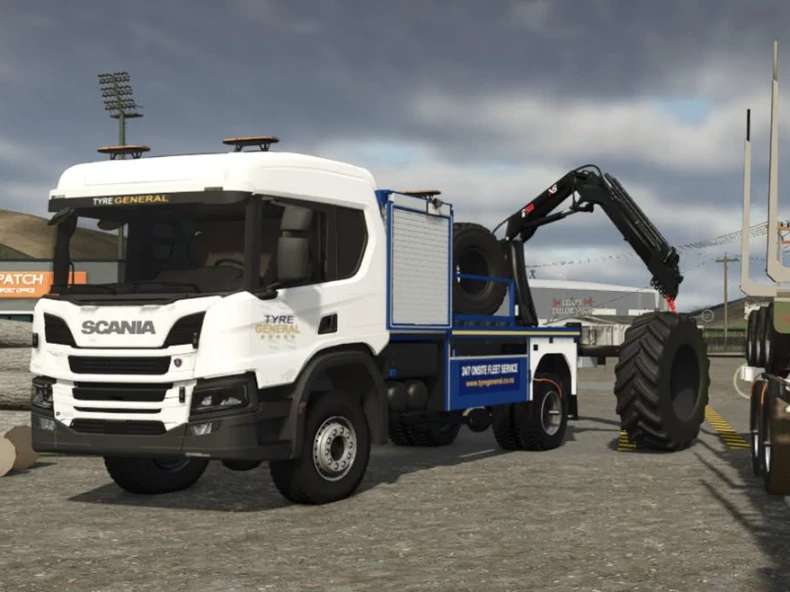
Tyre General Scania P v1.0
Bring a mobile tyre-service setup to your farm or yard. This FS25 pack brings together the Tyre General Scania P truck and three loose tyre sizes.
What it does
Portable service jack: collect it from the truck’s jack locker, carry it into position and use the pump interaction to raise equipment. Use the release valve to lower it.
Opening lockers: front tool lockers give you space for carrying items, with a dedicated locker for the jack. General locker cargo retention has not been verified in release testing.
Tyre lifting crane: a rear HIAB crane with a hook and tyre lifting strop, plus six deck restraints for transport.
Three loose tyre sizes: bare truck 315/80 R22.5, loader 750/65 R25 and tractor 710/70 R42 tyres.
Included in the download
Truck v0.1.0.14 and tyre pack v0.2.0.2, with installation notes.
Installation
Extract the main download ZIP once.
With FS25 closed, put the two individual mod ZIPs into your FS25 mods folder. Leave those ZIPs zipped and keep their filenames unchanged.
Install Interactive Control by Vertex Dezign separately for the clickable locker doors and cab controls.
Start FS25 and enable both included mods for your save.
Interactive Control is not included. The locally installed version is 1.2.0.1; a minimum compatible version has not been established. Full instructions are in README_INSTALL.txt.
Release notes
This pack is for tyre-handling and service roleplay. It does not remove or replace tyres already fitted to vehicles. Place suspended loads on the ground before saving until load persistence has been verified.
The current game log reports missing horn, indicator and attachment sound templates, along with other warnings. This release is not error-free. Jack and crane physics, general locker cargo retention and multiplayer were not verified during release preparation. Multiplayer support is declared in the mod files.
Author: Le Grice Signature Mods