Script Sentry v1.0
Script Sentry v1.0
Script Sentry is a free mod. All mods released by SecondChanceGaming3709 are free.
If you enjoy my work and would like to donate, it is always appreciated, but donations are never required.
Script Sentry – FS25 Mod Conflict Notifications
Version 0.3.2.0 — Public Beta
Have you ever installed a new mod and then discovered that another mod’s feature or control mysteriously stopped working?
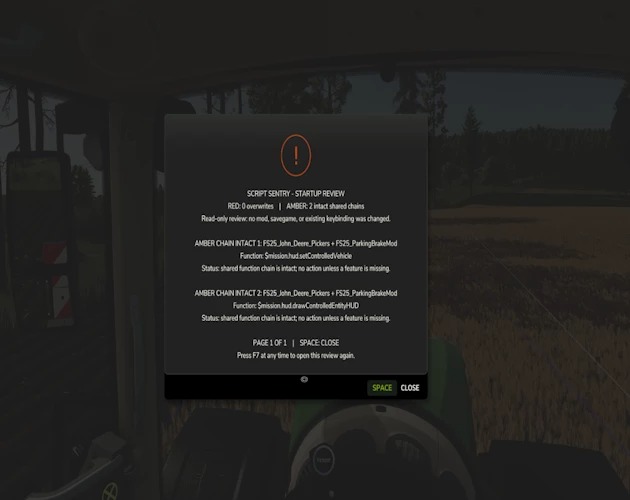
Script Sentry is a read-only diagnostic utility for Farming Simulator 25. It observes live Lua function chains during startup and provides an easy-to-read in-game review—no developer console or log reading required.
How the review works
GREEN: No broken function chains were found.
AMBER: Multiple mods share a function, but the official function chain remains intact. No action is usually required unless a feature is missing.
RED: A later mod replaced a function without preserving the previous implementation. Script Sentry identifies the mods involved, the affected function, and a recommended next step.
The review opens shortly after gameplay begins and remains visible until you close it.
Controls
Space: Close the review.
Right Alt + top-row 1: Reopen the review at any time.
Longer reports are divided into numbered pages. Close the current page with Space and press Right Alt + 1 to open the next page.
Script Sentry leaves no permanent icon, badge, or message covering the gameplay HUD.
Features
In-game startup review
Detects observed Lua function-chain overlaps and replacements
Names the mods and functions involved
Separates intact shared chains from likely overwrites
Native FS25 popup menu
Review can be reopened whenever needed
No developer console required
No manual log reading required
No savegame changes
No keybinding-file changes
No automatic conflict resolution
No mod disabling or load-order changes
No persistent gameplay HUD clutter
Script Sentry is a notification and diagnostic tool. It is not a mod manager or generic log extractor. It reports what it observes and leaves every decision with the player.
Optional companion mod
Script Sentry is fully compatible with FS25 FillType Monitor.
The two mods can be installed together:
Script Sentry reviews Lua function chains.
FillType Monitor tracks fill-type usage and remaining capacity.
Each mod works independently. Neither mod is required for the other to function.
Important: Do not rename the ZIP
Keep the exact filename:
AAA_FS25_ScriptSentry.zip
Farming Simulator loads script mods according to their filenames. The AAA prefix places Script Sentry near the beginning of the load order so it can begin observing function activity before most other script mods make their changes.
If the ZIP is renamed, Script Sentry may load too late and miss an overlap or overwrite, resulting in an incomplete startup review.
Do not:
Remove the AAA prefix.
Add words or version numbers to the filename.
Allow Windows to rename it with additions such as (1).
Unzip the mod into the mods folder.
Keep multiple copies of Script Sentry installed.
When updating, remove or replace the older copy so only one file named AAA_FS25_ScriptSentry.zip remains in the mods folder.
Public beta notice
Script Sentry reports observable function-chain activity, but no automated detector can identify every possible incompatibility.
An amber result does not automatically mean that two mods are incompatible. It means both mods are using the same function while the function chain remains intact.
Results should be treated as diagnostic guidance. If everything is working correctly, an amber result may require no action.
Please report unexpected results and include your FS25 log.txt when possible.
Platform: PC/Mac Multiplayer: Not currently supported Created by: SecondChanceGaming3709
Author: SecondChanceGaming3709