Custom Field Tool V1.2.5


Custom Field Tool V1.2.5

Features
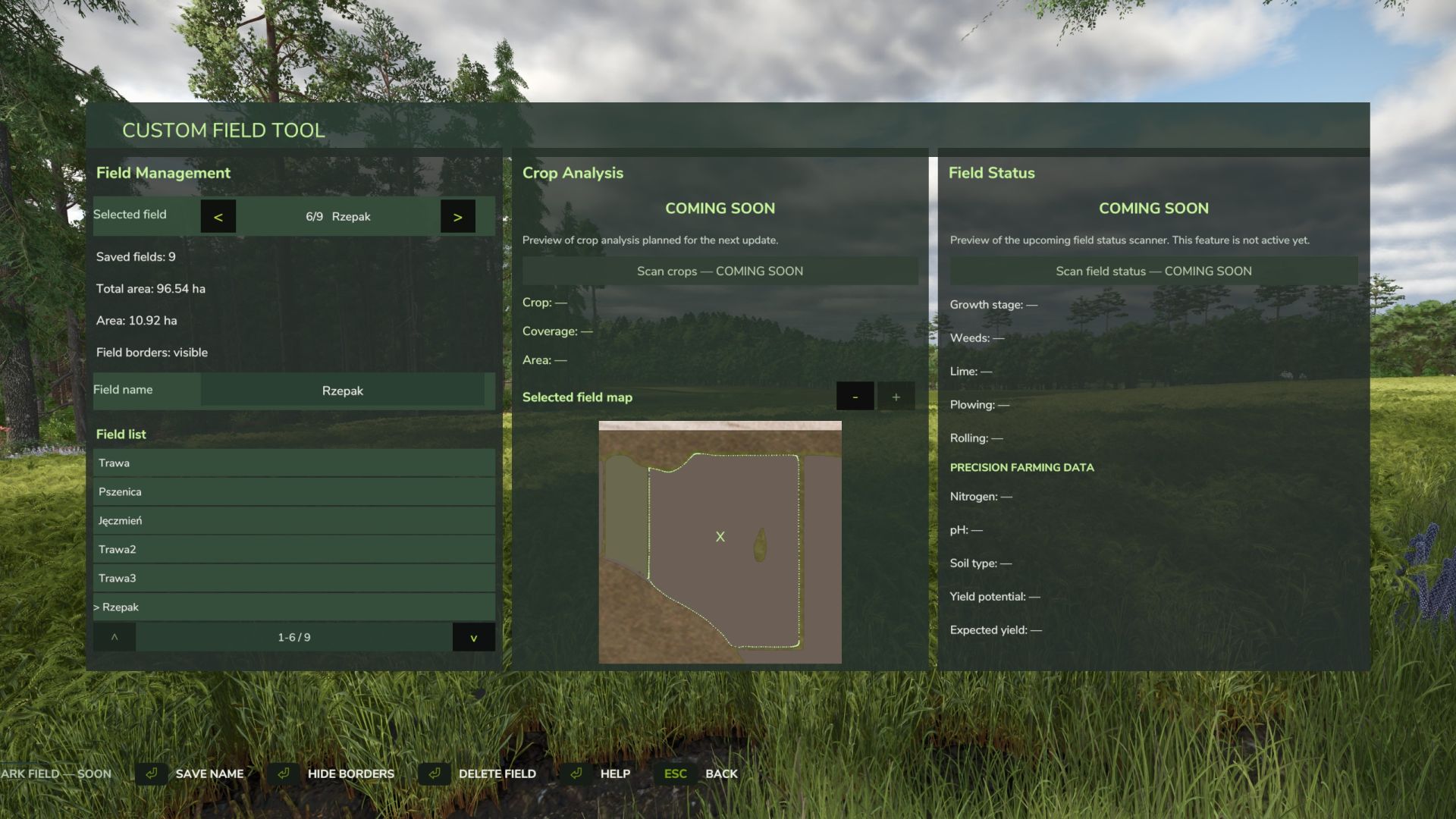
Creating custom field boundaries
Calculating field areas in hectares
Assigning custom names to fields
Displaying or hiding field boundary lines
Managing saved fields using a dedicated list
Dedicated map view for the selected field
Manual map zooming
Clear tablet map without vehicle, shop or other game icons
Deleting saved fields
Automatic integration with the saved game state
Multiplayer support
Fully configurable controls via the standard game settings
Default controls
F2 – Open / close the field tablet
Z – Switch field drawing mode
J – Add boundary point
K – Save current area

All key bindings can be changed in the standard Farming Simulator 25 control settings.

Languages
Polish
English
German
Multiplayer

The mod is still actively being developed, with additional features and improvements planned for future updates.

V1.2.5.0
Mod update from version 1.0.0.0 to 1.2.5.0
Added a point counter while creating a field.
Added the option to remove the last placed point.

Changed the field creation controls to make them more intuitive:
LMB –  add point
RMB – undo last point
K – save field
Added a graphical Help section with instructions for creating and saving fields.
Added Help support in Polish, English and German.
Improved the preview GUI and overall readability.
Improved the general usability of the mod.
Next update preview: planned field scanning with detailed information displayed for the selected outlined field.


Author: Mosit

Report bugs in the comments and help modders improve this mod. Always check the comments, you can find a solution.


Helpful Information: How to install FS25 mods | FS25 System Requiremnts | FS25 Modding Tutorial | Giants Editor for FS25 | How to Convert mods | FS25 Cheats

More Misc mods


About Farming Simulator 25 mods
Farming Simulator 25 supports game modding for PC, Xbox, or PS5. FS25 Mod may change your game from small to complete changes. You can create a Farming Simulator 25 mod file and share it with our community. When is a good time to try Farming Simulator 25 mods? We recommend playing a game with these FS25 mods after you finish the Farming Simulator 25 starting pack and are bored with the game basics. So it's time to try new machines, such as harvesters or tractors, which are not included in the basic game version.
As you already know, Farming Simulator 25 developers support mods installation, which will add more vehicles or lands to your game. Check our Best FS25 mods lists for PC, Mac, PS5 or Xbox Series. Just follow these simple steps: choose the LS25 mods category, download the mod for the Farming Simulator 2025 version, and install it into the mod folder. Remember, all Farming Simulator 25 Mods are free, and download as many as you want with no limits. We want to create one of the biggest Farming Simulator 25 Community and invite you to share FS25 mods with everyone.

Leave a Reply

Do you need help or to say thanks to the mod author? Just leave a comment below!